
Beschreibung
The MobiFlight profile for the Synaptic A22X for all combinations of the WinCTRL FCU, EFIS L, EFIS R, URSA MINOR 32 THROTTLE, PAC and AGP.
Configured by a real A220 Pilot, to match the haptics of the real airplane. Read the manual, not everything is according to the labels on the hardware!
NOTE: Everything which is marked INOP in the manual is missing SimVars which are already requested to Synaptic
The optional GM5 hardware bridge version requires a dependency linked below. It fixes the MACH and VS output.
Häufig gestellte Fragen
The Ultimate Synaptic A22X WinCTRL MobiFlight Profile
This MobiFlight profile enables compatibility between the WinCTRL FCU, EFIS L, EFIS R, URSA MINOR 32 Throttle, PAC, and AGP hardware for the Synaptic A22X in Microsoft Flight Simulator. The configuration matches real A220 aircraft haptics and has been set up by an experienced A220 pilot. Some functions may be unavailable due to missing simulator variables as noted in the manual. Users are advised to consult the manual for accurate usage and hardware labeling details.

Nutzerbewertungen
5 Bewertungen
Versionsgeschichte
- feat(FCU): add IAS speed output - feat(FCU): add speed unit output - feat(FCU): add XPDR AUTO/STBY toggle - feat(FCU): better legible STBY frequencies - feat(EFIS): add QNH/std output - feat(EFIS): add BRG pointer input for BRG1: FMS1 or VOR1 - feat(EFIS): add BRG pointer input for BRG2: FMS2 or VOR2 - feat(EFIS): add CRS mode to tune ILS/VOR NAV CRS - feat(PAC): add rudder trim L/R input - refactor(FCU): major restructuring - refactor(EFIS): major restructuring NEW: GM5 Hardware Bridge Version - feat(FCU): add MACH speed output - fix(FCU): display descending VS as negative
Ähnliche Addons
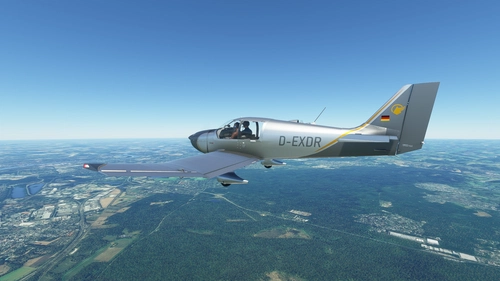
Robin DR400 (DR401/155CDI) D-EXDR Aero-Club Koblenz
Experience flying the Robin DR400 (DR401/155CDI) D-EXDR Aero-Club Koblenz in Microsoft Flight Simulator with this add-on, showcasing the default Asobo DR400-100 Cadet model.
von FoxtrotSierra
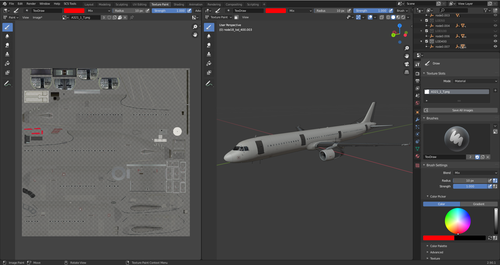
Project Mega Pack A321 V2.1+ 3D Paint Kit (Blender)
A .blend file for 3D painting in Blender with an imported version of the Project Mega Pack A321, designed to simplify livery creation process. Best used with LOD400 for optimal painting experience. Please note the 3D Model is subject to copyright by Project Mega Pack.
von FoxtrotSierra
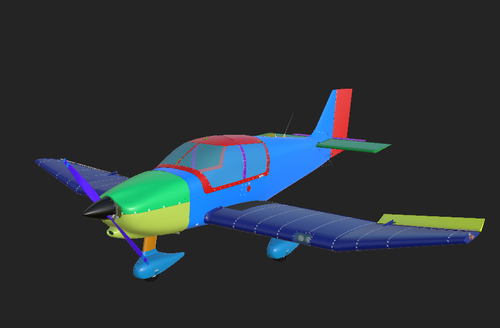
Asobo DR400 Substance Painter Paintkit
A paintkit for the Asobo DR400 aircraft in Microsoft Flight Simulator, specifically designed for Allegorithmic/Adobe Substance Painter. Modify textures for the Fuselage and Wings with color overlays functioning as masks for specific regions. Instructions provided for exporting files correctly for use in MSFS 2020.
von FoxtrotSierra
![[A32NX] Airberlin Cup](https://cdn.flightsim.to/images/13/c5D7Yg8B.png?width=500)
[A32NX] Airberlin Cup
Explore the Airberlin Cup liveries for the FlyByWire A32NX mod, including red and white versions. Easily install by extracting the contents to the TEXTURE folder.
von FoxtrotSierra
Melden Sie sich an, um an der Diskussion teilzunehmen
AnmeldenKommentare(56)
10 days ago
28 days ago
1)do you need to use the winctrl software at all here and if yes should you select a winctrl profile?
2)within MSFS24 do you still need to assign controlbindings in the controller options page of is this all done for you?
28 days ago
2) No
about 1 month ago
about 1 month ago
about 1 month ago
about 1 month ago
about 1 month ago
about 1 month ago
about 1 month ago
about 1 month ago
about 1 month ago
about 2 hours ago
about 2 months ago
about 2 hours ago
2 months ago
2 months ago