
Beschreibung
MSFS Addon Manager Pro | Scenery Coverage, GSX Checker & Conflict Detector
Ever asked yourself “which airports do I actually own?”, “do I have a GSX profile for this one?”, or “why are there double buildings at this airport?” This tool answers all three at a glance.
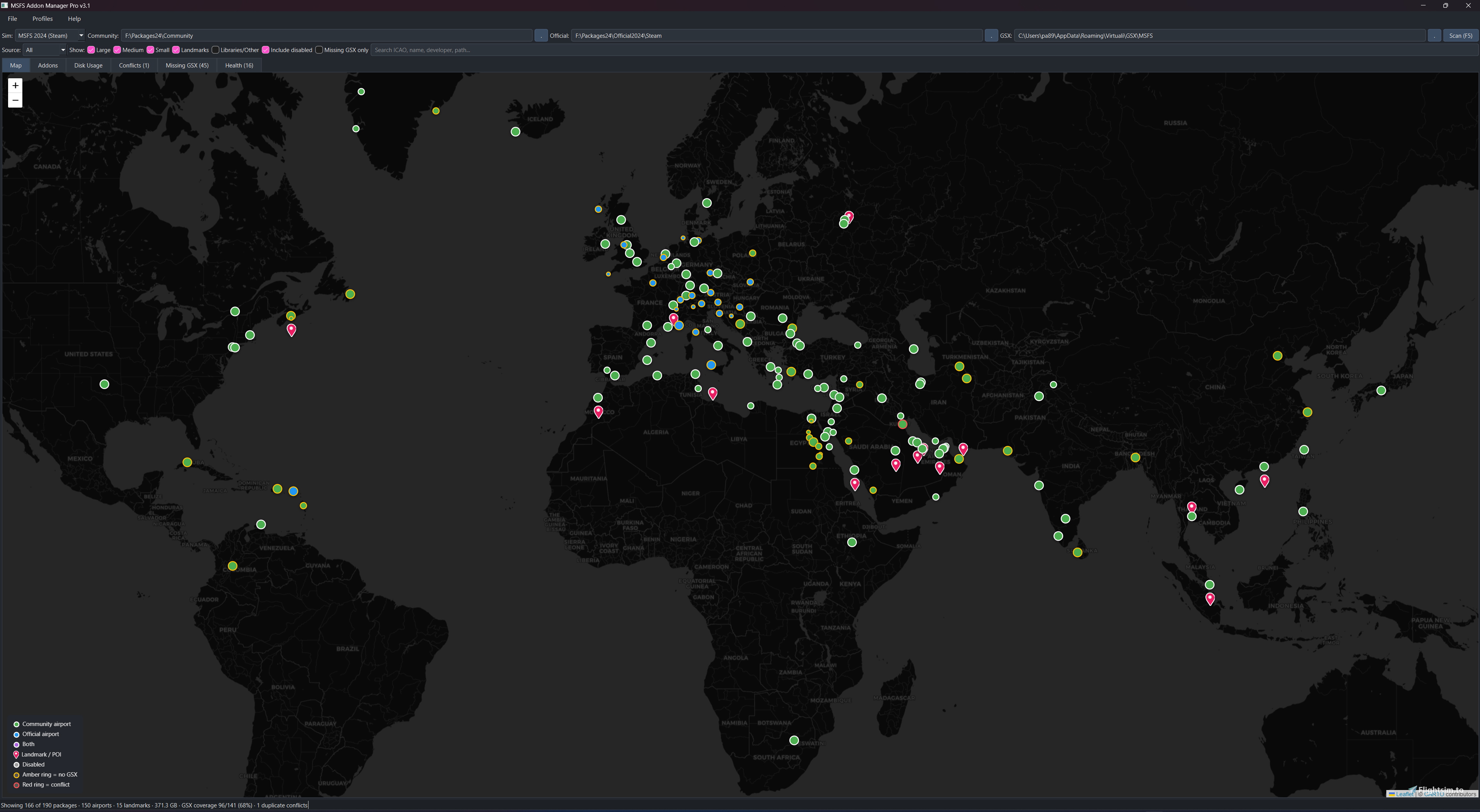
MSFS Addon Manager Pro scans your Community and Official packages for both Microsoft Flight Simulator 2020 and Microsoft Flight Simulator 2024, identifies airport scenery, landmarks, and POI packs, and presents everything in an in-app view with a fully searchable and sortable table.
In-App Scenery Coverage View
- Every airport addon appears as a colored circle: green for Community, blue for Official, purple for both, and gray for disabled
- Airport circles are sized by airport class
- Landmark and POI packs are shown at their approximate city location
- Amber ring means the airport has no GSX profile
- Red ring means a scenery conflict was detected
- Multiple addons in the same city are separated clearly for easier viewing
- Popups show airport name, city, installed packages, developer, and size
Smart Airport Detection
- Evidence-based ICAO identification cross-checks manifest titles and folder names against a 38,000-airport database
- Detects addons with wrong, missing, or misleading ICAO codes in their manifest
- Handles alphanumeric codes such as HE15, CAA8, and T004
- Handles misspelled titles and empty manifests
- Landmark packs are located by city, with country-level fallback for larger POI packs
Conflict Detection
- Instantly lists airports covered by more than one enabled scenery
- Helps identify common causes of double buildings and z-fighting
- Conflicted airports are highlighted in the table
GSX Coverage
- Scans your GSX profile folder and shows Yes or No per airport
- Double click on the missing GSX profile to auto search for it in Flightsim.to
- Includes a dedicated Missing GSX tab
- Shows every large and medium airport you own that has no GSX profile
- Includes one-click ICAO list copy
- Shows live GSX coverage percentage in the status bar
Addon Management
- Enable or disable Community addons individually or in batches
- Save named sets of enabled addons (for example "VFR Europe") and switch between them in one click.
- Disabled addons are safely moved to a Community-Disabled folder next to your Community folder.
Fully reversible and nothing is deleted
- Search by ICAO, airport name, developer, city, or folder
- Filter by size class, landmarks, libraries, source, disabled addons, and missing GSX only
- Export your full collection data to CSV
- Auto-detects MSFS 2020 and MSFS 2024 paths for Steam and Microsoft Store versions
- Switch between simulators using one dropdown
Disk Usage
- A treemap of your collection where rectangle area = addon size, colored by type and following your active filters. Hover for details, double click to open the folder.
Health tab & more
Requirements
- Windows 10 or Windows 11
- Microsoft Flight Simulator 2020 and/or Microsoft Flight Simulator 2024
- GSX optional, only required for GSX profile coverage detection
Installation
- Download the ZIP file.
- Extract the full folder anywhere on your PC.
- Keep all included files together.
- Run AddonManagerPro.exe.
Do not move the EXE outside the extracted folder. The included internal files are required for the application to run correctly.
Usage Notes
- Disabling addons moves the folder out of Community into a Community-Disabled folder on the same drive.
- The enable and disable process is instant and reversible.
- Close the simulator before enabling or disabling addons.
- Landmark positions are approximate and anchored to the pack’s city.
- Nothing in your Official folder is ever modified. Official packages are read-only.
Credits
- Not affiliated with Microsoft, Asobo, FSDreamTeam, or GSX.
- This upload is a utility for Microsoft Flight Simulator in-sim addon management. It is not a website, hosted service, or browser-based application. The visual scenery coverage view is displayed inside the desktop application and is used only to help users identify installed airports, landmarks, GSX profile coverage, and scenery conflicts. The tool runs locally, scans local MSFS folders, and does not require users to visit or use an external website.
MSFS Addon Manager Pro
MSFS Addon Manager Pro is a desktop utility for Microsoft Flight Simulator 2020 and 2024 that scans and organizes your installed airport, landmark, and POI add-ons. It provides a visual map of scenery coverage, checks for GSX profile presence, and detects potential scenery conflicts such as double buildings. The tool offers advanced search, filter, and management options, including the ability to enable or disable community add-ons safely. User data is handled locally, with support for both Steam and Microsoft Store versions.


Nutzerbewertungen
3 Bewertungen
Versionsgeschichte
Fixed API Key Error
In Sammlungen enthalten(1)





Ähnliche Addons

GSX Profile - OERK - King Khaled Intl. Airport, Riyadh
Enhance your Saudi Arabian flying experience with this GSX profile for OERK - King Khaled Intl. Airport in Riyadh by BanditSim. This ongoing project meticulously details terminals, aprons, gate sizes, and parking positions, aiming for comprehensive coverage of the airports facilities. Features include terminals 1, 2, 5, and apron 1, with ongoing updates to enhance realism.
von codered89x

Ground Air Start Unit - Boeing 707-320C
This add-on introduces a realistic ground pneumatic air start cart for the Working Title or iniBuilds Boeing 707-320C in Microsoft Flight Simulator 2024. The air start unit is controlled via a new EFB application and operates according to real-world procedures, providing 45 PSI of air for engine starts as used on classic 707s. The system interacts with aircraft valves and displays live pressure and flow information. It is necessary to remove the add-on folder before updating the 707 to prevent potential compatibility issues.
von codered89x

Fenix State Keeper - your Fenix A32x cockpit, exactly as you left it
Fenix State Keeper automatically saves and restores the cockpit state of your Fenix A32x aircraft between simulator sessions, preserving the position of switches, knobs, circuit breakers, seats, and more. Each airframe and livery has its own memory, supporting up to 15 saved states per aircraft. The tool operates safely, restoring only parked aircraft and avoiding critical or unsafe actions. Compatible with MSFS 2024 and all Fenix A319, A320, and A321 variants, this utility does not modify simulator or aircraft files.
von codered89x
Melden Sie sich an, um an der Diskussion teilzunehmen
AnmeldenKommentare33
However, it lacks the option to specify an alternative path. Let me explain: a great many of us (578,000 simmers) use the "MSFS Addons Linker 2020/2024" add-on.
It allows you to store your airports sceneries (among other things) on a different hard drive, for instance; when you want to use a specific airport, you simply select it, and the tool creates a link within the "Community" folder.
It would therefore be helpful to be able to specify this path so that your add-on can detect all the airports. (I currently have very few airports in my "Community" folder.)
For exmple my path is : E:\Flight Sim\MSFS 2020 Addons
Thanks!
Thanks for the feedback, you can disable addons and enable them, they will automatically be moved out, also the scanner will still show your addons that are disabled in gray. On the other hand, you can specify the path yourself. Either copy paste it or click the dot next to the bar and select the folder. Hope I got you right and what you asked for is covered, otherwise please feel free to elaborate more and will be happy to consider your feedback. Thanks again!
I have located the field you are referring to, but that’s not quite it!
Simply put, you currently offer 3 search paths: "community," "official," and "gsx."
The idea is to add a 4th search path—which could be named "user" or whatever you prefer. That’s all!
In my case, this directory contains all the freeware airports I own—hundreds of them.
That’s the idea.
Thanks.
[0909/161754.098:WARNING:resource_bundle_qt.cpp(83)] locale_file_path.empty() for locale
tried to start it again and still crashing with the same entry in the debug.log. in this way, its completly unusable.
Bez sensu ten addon i to jeszcze PRO!!