
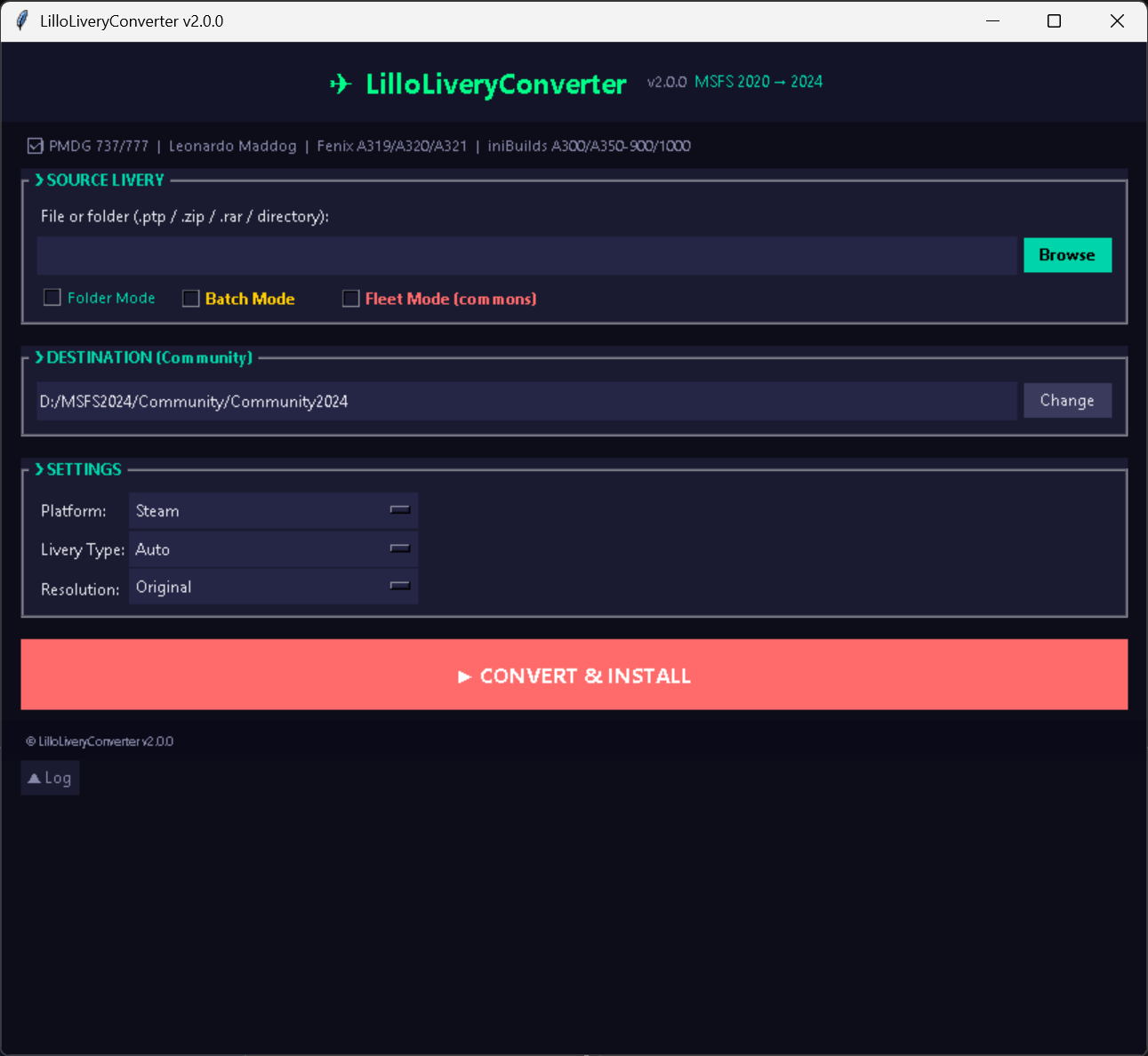
Beschreibung
# LilloLiveryConverter — MSFS2024 Livery Converter
## What is it
LilloLiveryConverter is a Program that automatically converts MSFS2020 liveries into standalone packages compatible with Microsoft Flight Simulator 2024 and viceversa.
## Supported Aircraft
- Fenix A319/A320/A321
- **iniBuilds A350-900/1000, A300-600, A300-600F
- PMDG 737-600/700/800/900/900ER, 777-200ER/LR/300ER/F
## How it works
1. Download any MSFS2020 livery ZIP from flightsim.to
2. Drag & drop the ZIP onto the converter window
3. The tool auto-detects the aircraft type (PMDG, Fenix, Maddog, iniBuilds)
4. Click "Convert & Install"
5. The converter handles texture conversion, manifest generation, layout generation, and installs to your Community folder
## Features
- Auto-detect — recognizes PMDG, Fenix, Maddog X, iniBuilds from the livery title
- Smart texture pipeline — DDS → KTX2 conversion, BC6H → DXT5 for Maddog X, resolution scaling (2K/4K/8K)
- Automatic texture.cfg — fixes fallback paths for MSFS2024 base packages
- Fleet Mode — merge common textures across multiple liveries (shared interiors)
- Batch Mode — command-line support for mass conversion
- PTP support — converts native MSFS2020 PTP format
- Standalone packages — generates proper manifest.json, layout.json, dependencies, and thumbnails
## Installation
1. Download LilloLiveryConverter.exe
2. Run it — the GUI window opens
3. Select your MSFS2024 Community folder path
4. Choose any MSFS2020 livery ZIP onto the window and convert
## Changelog
v1.0 — Initial release
- PMDG 737/777 family support
- Leonardo Maddog X MD-80 family support
- Fenix A319/A320/A321 support
- iniBuilds A350-900/1000, A300-600, A300-600F
LilloLiveryConverter
LilloLiveryConverter is a tool that enables automatic conversion of Microsoft Flight Simulator 2020 liveries into standalone packages compatible with MSFS2024 and vice versa. It supports popular aircraft including the PMDG 737 and 777 series, FlyByWire A380X, Fenix A320 family, and iniBuilds Airbus and A300 variants. The converter offers features such as auto-detection of aircraft type, smart texture processing, batch mode, and support for both PTP and ZIP formats. Converted liveries are installed directly to the Community folder and structured for MSFS2024 compatibility.


Nutzerbewertungen
20 Bewertungen
Versionsgeschichte
# Changelog ## v2.0.0 (2026-06-02) ### Added - **Extract PTP to MSFS2020**: New checkbox mode that extracts PTP/ZIP/RAR files directly to MSFS2020-native format (DDS textures preserved, no KTX2 conversion). For users who need to recover PMDG liveries after OC2 shutdown. Destination path uses the Community folder field below.
Melden Sie sich an, um an der Diskussion teilzunehmen
AnmeldenKommentare(105)
about 7 hours ago
4 days ago
Only issue I ran into was when installing multiple liveries, only the first was installed, with batch mode enabled. However extracting and manually installing the others in folder mode is a workaround.
6 days ago
I found that PMDG 737 always convert to BW winglets so I had to update livery.cfg manually to SSW winglets.
Hope for future update!
Ty!
6 days ago
12 days ago
14 days ago
23 days ago
https://flightsim.to/addon/77244/ana-all-nippon-airways-777-381er-ja784a-eevee-jet
about 1 month ago
about 1 month ago
about 1 month ago
2 months ago
12 days ago
2 months ago
2 months ago
- When converting A306, I find "A32N_INT_SPARES_ALBD.PNG.KTX2", "A32X_DECALS_COCKPIT_LIVERY_ALBD.PNG.KTX2" and their jsons in results. Other FS24 liveries don't have those files so they're not needed?
2 months ago
3 months ago
3 months ago