

Beschreibung
Real airlines debrief every flight. Now you can too.
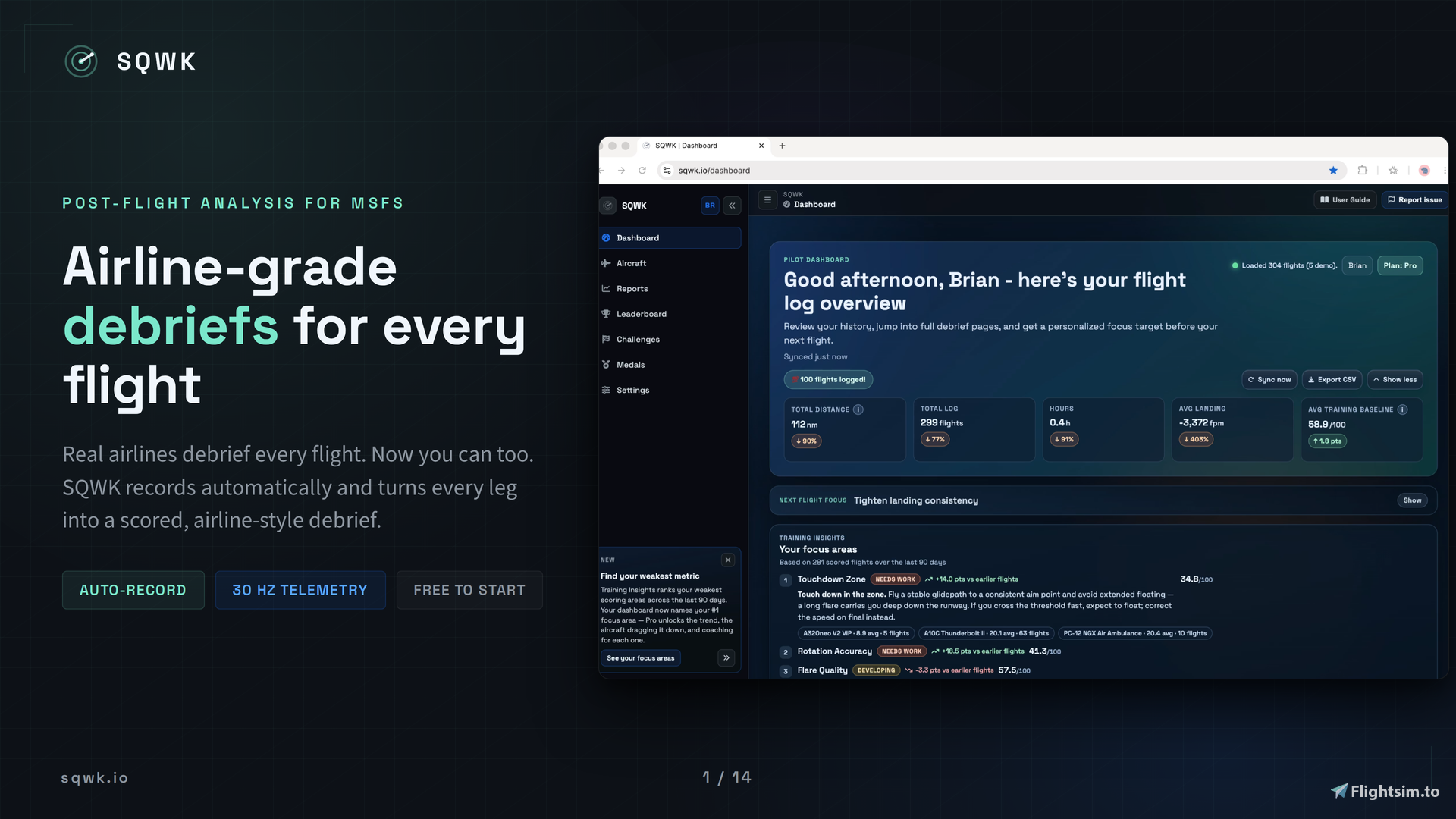
SQWK brings airline-grade post-flight review to Microsoft Flight Simulator. Fly normally. SQWK quietly captures your flight at 30 Hz, then turns it into a clear debrief: a plain-language verdict, a 12-metric landing score, a full approach reconstruction, exceedance callouts, a 3D replay of your approach and rollout, and trend tracking that watches your progress week over week and month over month.
It is built for pilots who want to review the whole arrival, not just chase a single landing number. A landing-rate readout tells you how hard you touched down. SQWK shows you the whole story: how stable the approach was, where you floated, where you touched down and how far off centerline, what the weather was doing to you, and what to work on next flight, tuned to the aircraft you actually flew.
How it works
- Install. One Windows setup wizard installs the SQWK Telemetry Exporter and the optional in-sim Flight Review toolbar panel for MSFS 2024 and MSFS 2020.
- Sign in with your free SQWK account.
- Fly. Recording starts and stops automatically. No buttons to remember.
- Review. Your flight uploads after rollout and the debrief is ready in the browser on any device. In the sim, the panel shows your landing score the moment you touch down, with a runway-aware breakdown by the time you reach the taxiway.
Inside the debrief
- 12 scored metrics across approach, touchdown, and rollout: landing rate, touchdown G, bounce count, flare quality, touchdown-zone placement, centerline deviation, rollout heading stability, bank at touchdown, approach stability, takeoff ground roll, rotation accuracy, and flap overspeed time
- Approach reconstruction from the 5-mile fix to runway exit, with your flown path plotted against the ideal 3-degree glidepath and every exceedance called out
- Scores that understand context: weather severity (7 levels), crosswind component, visibility, runway surface, time of day, and runway lighting all factor into the grade, so a good landing in ugly weather gets the credit it deserves
- Flap overspeeds broken down bust by bust: which flap setting, its Vfe limit, your peak speed, and how long you stayed over it, shaded on the speed charts
- Rollout analysis that ends where your rollout ends, including a rollout distance figure that shows exactly how much runway you used
- Real FDM touches: single-engine taxi is detected and credited (never penalized), and route adherence is shown as plan-vs-actual context, never as a grade
- All of it backed by a database of 32,000+ runways at 26,000+ airports: displaced thresholds, surface, lighting, and length all factor into your score
See it, replay it, share it
- 3D approach view and a full flight replayer with a control input overlay (stick, throttle, rudder) and a cinematic external-camera mode
- Touchdown spread plots every landing you have flown on one runway diagram, with touchdown-zone percentage plus lateral and longitudinal spread, so you can see whether you land in the same place every time or scatter across the pavement
- Shareable landing PNG cards and public flight links, so you can send an approach to an instructor or post a great one to your community
- A 3D globe of your flight history, flight photos, and full telemetry charts on the browser dashboard
Get better over time
- Weekly and monthly Flying Reports summarize your flying and your trend against a baseline cohort
- Training Insights ranks your weakest scoring areas across your last 90 days and tells you what to practice next
- Local flight history is cached on-device per signed-in account, so the exporter debrief view loads instantly and works offline
Fly it by the book (SQWK Pro)
- 115+ aircraft profiles with POH-based reference values: flap schedules with Vfe limits, V-speeds, and crosswind limits, so a 737 is scored like a 737 and a C172 like a C172
- Per-airframe cheatsheets with approach speeds, V-speeds, limits, and checklists whose line items explain how each step affects your score
- Your Performance on every aircraft page: your average landing rate, approach stability, and touchdown speed plotted against that type's own targets
- Procedural coaching tied to your airframe, unlimited flights, and 1-year telemetry retention
Flying with a SimBrief OFP?
- Import your plan for planned-vs-actual review: fuel burn, weights, reserves, block time deltas, and route adherence against your filed route
Make it count
- A medal case built from verified telemetry: destination quests, landing streaks, storm-condition medals, career milestones, and skill ratings that stay current only while you keep flying
- An opt-in public pilot profile to show off your medals and ratings
- Daily and weekly challenges with public leaderboards (alpha), where every pilot flies the same aircraft, runway, and weather
Free and Pro
Free SQWK accounts get the full debrief: 30 Hz telemetry capture, 20 flights per month, exports (JSON, CSV, KML, PLN), public share links, shareable landing cards, and the same charts, 3D approach view, replay, and Flying Reports used everywhere else. SQWK Pro is an optional upgrade for aircraft-specific intelligence: the 115+ profile library, cheatsheets, procedural coaching, per-type performance stats, unlimited flights, and 1-year retention.
Want another opinion? Check out a recent review of the app on MSFS Addons!
Download
- Windows Installer: available right here on flightsim.to. Run the setup wizard and you are done. The in-sim panel installs alongside the exporter.
Compatibility
- Operating system: Windows 10 or Windows 11 (64-bit)
- Simulator: Microsoft Flight Simulator 2024 or Microsoft Flight Simulator 2020
- Account, dashboard, and release notes: https://sqwk.io and https://sqwk.io/changelog
Häufig gestellte Fragen
SQWK Flight Debrief & Analyzer
Auto-records every MSFS flight and turns it into a real post-flight debrief with approach scoring, landing analysis, exceedance callouts, and full replay. Track improvement with weekly and monthly trend reports and unlimited flight history.

Nutzerbewertungen
4 Bewertungen
Versionsgeschichte
Fixed: Steam no longer gets stuck on “Stopping” after you quit MSFS 2024 with “Launch with MSFS 2024” turned on. When the sim starts SQWK, SQWK now closes itself after the sim exits, once any flight upload in progress has finished. New: “Quit when MSFS 2024 closes” setting under Settings > Autostart, on by default. Turn it off to keep SQWK running after the sim closes. It doesn’t affect SQWK when you start it yourself or with Windows. Notes: Existing setups update automatically. Start SQWK once after updating, and the change applies from your next sim launch. Routine dependency updates.
Melden Sie sich an, um an der Diskussion teilzunehmen
AnmeldenKommentare(45)
5 months ago
I believe in SQWK Telemetry. And also believe in the developer as he continues its growth and development. Looking forward to my continued use of it, as well as all the present features and those upcoming. As I've watched over the last month, I have seen that growth which has magnified my satisfaction with SQWK Flight Review. The Telemetry Exporter works flawlessly and delivers a most detailed debriefing report. The likes of which I have not seen in my years of flight simming.
What you've with the latest release (v2.2.0), is an absolute thumbs up.
This is truly top-shelf, and I highly recommend it to all pilots... no matter what you fly.
about 2 months ago
about 2 months ago
2 months ago
2 months ago
Where SQWK adds on is everything around the touchdown number: approach stability from the 5-mile fix-in, glidepath and speed deviations, flare, rollout, and then trend tracking that watches those habits week over week. For your situation specifically, Training Insights looks at your last 90 days and tells you which areas are slipping, so you can aim each sim session at something concrete until you're back in the real airplane.
There's also an opt-in public pilot profile with skill ratings and achievements. Mine is here if you want to see what it looks like: https://sqwk.io/pilots/bcsavage (definitely need to work on my approach and landing scores)
The free tier covers 20 flights a month and covers most use cases. The easiest answer is to run both for a few flights and judge for yourself. Good luck with the hour building and happy flying!
4 months ago
I just did my first flight, and something's wrong with the Telemetry drilldown/Performance/Weights and fuel values.
My TOW is 429,000 lbs, which is normal for an A330-900 with 436 passengers in economy class. And it says under this value:
"Over MTOW by 255,405 lbs!"
The same, of course, applies to the Landing Weight.
Thanks for your help.
4 months ago
The "Over MTOW" warning is a real bug on our end, not anything you did. Your 429,000 lb takeoff weight is well within an A330-900's limits. The app was checking your A330 against a narrowbody max weight (an A320/737-sized number, around 174,000 lbs) instead of the A330's own, so the margin came out wildly negative. The landing weight failed for the same reason.
I found the cause and have a fix written: the A330, and the other widebodies that were missing them, now carry their real published weight limits, and the generic fallback no longer applies a narrowbody limit to a widebody. It'll go out in an upcoming update, and once it's live the warning will clear and that flight's score will correct itself. Nothing you need to do on your end.
4 months ago
4 months ago
Because of this, in the top and bottom right presets, the panel only goes up to one-third of my screen width from the left edge, while the center preset stays in the middle of the first third of my screen.
With the new setting to manually move the panel, I can move the panel to the right edge of the screen where I want. The problem is that my position isn't saved. It only works once. If I turn off recording and turn it on again, the panel returns to the position in the preset settings (which only recognize 1/3 of the screen). In other words, the presets always override the position manually selected by the user, and I have to manually move it to the position I want every single recording.
4 months ago
5 months ago
4 months ago
5 months ago
5 months ago
5 months ago
For example, if I select to appear in the top left, the panel appears to the bottom right. If I select center, it appears shifted to the right. The only position that works when selected in the settings is bottom left. It also seems that any change to this setting requires restarting the sim to take effect.
Furthermore, for some reason, I can drag the panel to the left edge of the screen, but I can't get it to dock on the right edge, neither by manually dragging it as before, nor by selecting it in the settings. It always stays a certain distance from the right edge of the screen, which is precisely the position I want it to be in.
Could you take a look at this? Before this update, I was able to manually drag the panel to the right edge of the screen.
5 months ago
5 months ago
5 months ago
I understand this is a bit unintuitive and could be hard on some users machines so I got something in the works to make it even easier!
5 months ago