
Flightsim.to
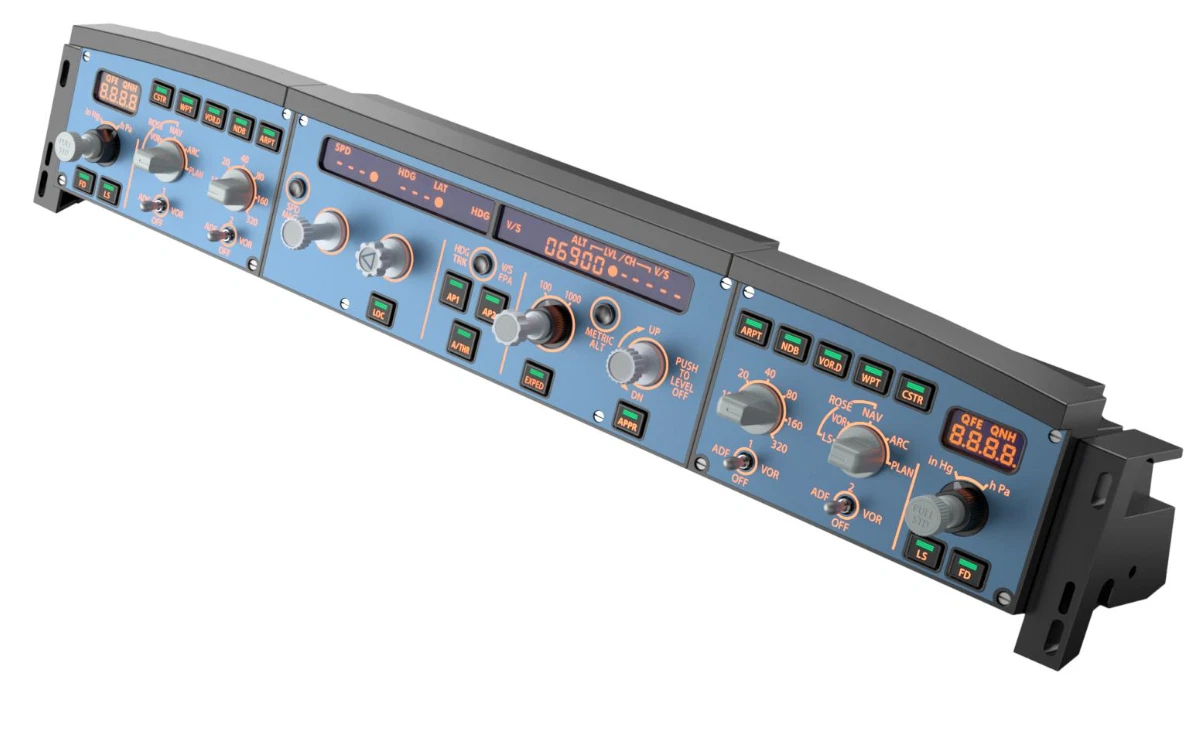
    Aerosoft A340-600 Winctrl Efis-FCU Capt/FO MCDU Capt - Image 1

    Beschreibung

    Mobiflight profile for the Winctrl FCU/Efis Capt + FO, MCDU Capt.

    IMPORTANT NOTICE!!!

    Currently the screen display MCDU is not working.

    This add-on provides a Mobiflight profile for the Aerosoft A340-600 and supports the Winctrl FCU and EFIS for the Captain and First Officer, as well as the Captain's MCDU. The profile enables the functionality of all controls, including LCD dimming and backlighting. The on-screen displays are functional with minor limitations.


    The Mach Speed ​​indicator does not automatically switch in Managed mode.

    I am still looking for a solution to this minor issue.

    Please let me know if you encounter any further problems!

    Have fun flying!

    Mobiflight 10.5.3.24 Beta or newer required


    Version 1.1

    Previous error in the V/S display fixed!

    The V/S display FCU now works fully in TRK/FPA mode!

    MCDU display is still not supported! Aerosoft is looking for a solution.


    Version 1.2 should fix the problem with V/S -1000 in managed mode.


    Version 1.3 The 00 speed issues are fixed and V/S now works reliably.

    Automatic Mach switching is not yet working in the Win/FCU display!


    Version 1.4 QNH display error fixed.

    Note: If there are discrepancies in ONH between the aircraft and the Winctrl display, disconnect Mobiflight. Now switch the aircraft to Hg and set the value to 29.92. Then reconnect Mobiflight. It's best to connect Mobiflight only when the aircraft is powered on.

    Kommentare(62)

    Melden Sie sich an, um an der Diskussion teilzunehmen

    Anmelden
    G

    9 days ago

    hello aerosoft release update for 340 winwing compatibilty !!! i test but dont work for me ....
    c
    clempnerAuthor

    about 3 hours ago

    Everything is now compatible with SimAppPro.
    m

    18 days ago

    Thanks for making this. For me, I installed it like the instructions say (and like the other mobiflight profiles I've used) but when I turn the knobs and buttons on the FCU, nothing works. When I go to edit an individual item, I see that the right preset is filled out (e.g. Alt Dec shows Aerosoft vendor, right aircraft, autopilot system with correct preset: AS A340 Altitude Knoc Dec). So that's fine. But at the top it says choose input and the Module is blank. So it doesn't recognize something. If I use Scan for Input, I can map it correctly and it works. I could do that but I would prefer not to if it works for others out of the box so to speak. Is there something I can try to make it recognize it?
    c
    clempnerAuthor

    13 days ago

    Do you only have one FCU? Since the profile was created for EFI L and R and FCU, that could be the reason. But that's just a guess. You might find something on the mobiflight Discord server.
    m

    12 days ago

    Thanks though I think it was because it was "orphaned" so all is well. Thanks again.
    d

    20 days ago

    Thanks a lot !
    A

    about 1 month ago

    Thanks
    h

    about 2 months ago

    As it provides the API for the MCDU, when will it be updated?
    p

    about 2 months ago

    My Ouestion aswell ? Now on Version 1.02 it should ? work..
    c
    clempnerAuthor

    about 2 months ago

    From Aerosoft Forum

    this was an error in the 1.02 changelog and has been corrected by now: only the next version will deliver a hardware interface, through which interested parties can read out the mcdu screens.
    N

    about 2 months ago

    Heyo, first off all: thanks for this profile! I love how things that other people cant get to work (like the altimeter setting displaying hPa correctly) just work here.
    Whats weird for me: the lighting of buttons (like the FD, LS, A/THR, AP1/2 etc.) are very very dim. They light up SLIGHTLY but are super dim.
    c
    clempnerAuthor

    about 2 months ago

    I occasionally have problems with the LED keys as well. I simply start the Winctrl application and then close it again; after that, everything works perfectly.
    p

    3 months ago

    Still not working with the MCDU Display mode, i read at discord Aerosoft has sent the relevant data to the Hardware Manufacturer but how does this work with Mobiflight ??
    c
    clempnerAuthor

    2 months ago

    I don't think it works yet, based on what I've read in various forums.
    b

    3 months ago

    Thanks for your work on this.
    s

    3 months ago

    Also sometimes the QNH numbers dont match what im seeing on the sim . like right now i see 29.88 on my EFIS but in the sim its 29.89. Much respect and love your way
    s

    3 months ago

    When switching from STD QNH to QNH , the displayed QNH disappears . just the word QNH . the numbers stay visible . Thanks alot for your hard work
    c
    clempnerAuthor

    3 months ago

    I'm looking for a solution for the QNH display. The differences in the digits don't always occur; I believe they are rounding errors by WinCtrl.
    2

    3 months ago

    Bless you! I haven't any winctrl airbus panels, but I transfered your custom controls to the EFIS B737 + FCU buttons on Bravo TQ and my first experience with A346 was very comfortable! Thank you again)
    c
    clempnerAuthor

    3 months ago

    That's great if this works too. your welcome
    MSFS 2020MSFS 2024

    Aerosoft A340-600 Winctrl Efis-FCU Capt/FO MCDU Capt

    This add-on provides a Mobiflight profile for the Aerosoft A340-600 and supports the Winctrl FCU and EFIS for the captain and first officer, as well as the captain's MCDU. The profile enables the functionality of all controls, including LCD dimming and backlighting. The on-screen displays are functional with minor limitations.

    Downloads1K
    Version1.4
    Dateigröße12.8 KB
    VeröffentlichtVor 3 Monaten
    AktualisiertVor 3 Monaten

    Nutzerbewertungen

    4.8

    10 Bewertungen

    5
    80%
    4
    20%
    3
    0%
    2
    0%
    1
    0%

    More Information

    Simulator
    MSFS2020/24
    KategorieMiscellaneous
    Zugehörigkeit
    Aerosoft A340-600 Pro

    Versionsgeschichte

    QNH display error fixed.