
Beschreibung
Visit https://www.touchdownfx.com for the latest version, online leaderboards, detailed guide and much more!
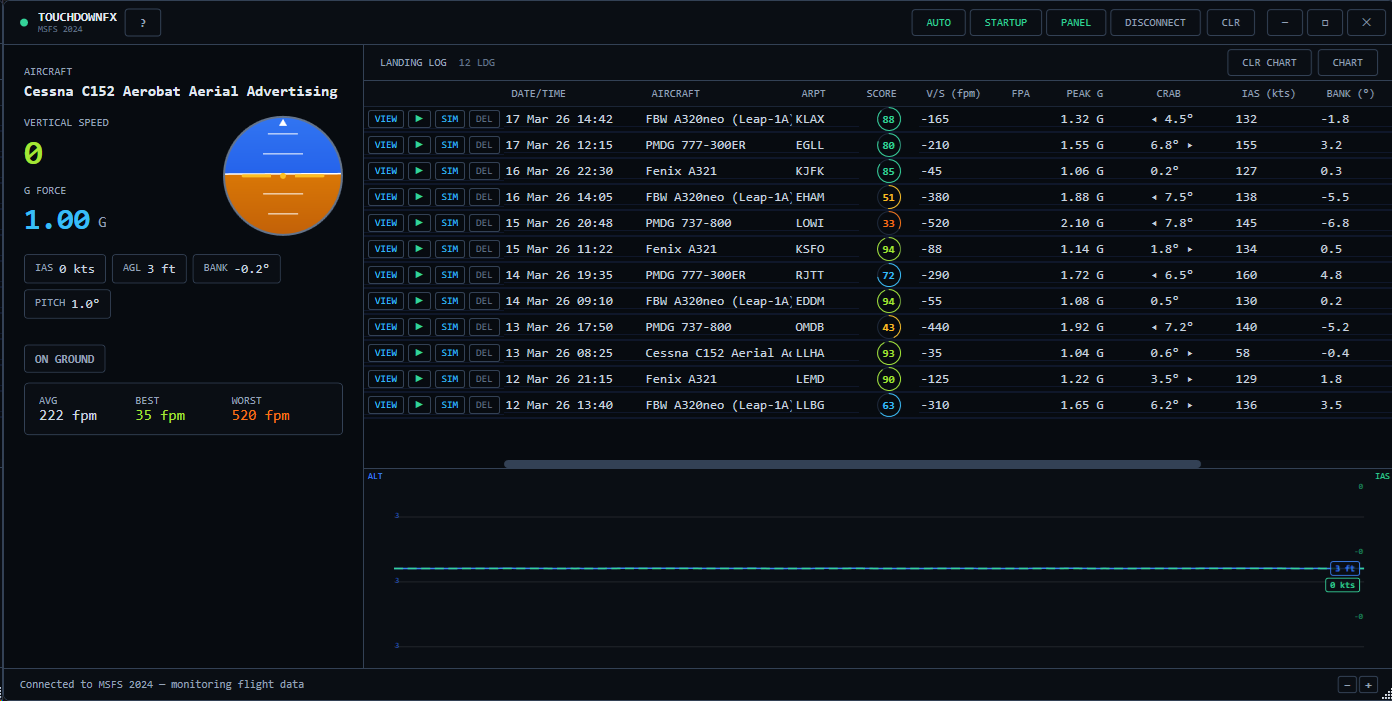
TouchdownFX is a free, lightweight landing analysis tool for Microsoft Flight Simulator 2024. It connects directly to the sim via SimConnect and automatically detects every touchdown, giving you instant, detailed feedback on your landing quality.
Requires .NET Runtime (6.0+) installed
Composite Landing Score (0–100):
- Every landing receives a composite score based on six factors — not just vertical speed
- V/S (45%), centerline deviation (20%), crab angle (10%), bank angle (10%), G-force (10%), pitch attitude (5%)
- Aircraft-aware grading — automatically detects your aircraft category from approach speed (Light, Turboprop, Airliner, Heavy) and adjusts V/S scoring accordingly. A 200 fpm landing in a 747 scores
just as well as an 80 fpm landing in a Cessna.
- Scoring thresholds derived from real-world standards: FAR 25.473 structural limits, Airbus crab angle limits, Boeing operations data
- Visual score ring with animated progress indicator in the landing log, scorecard, and in-game toast
- Full score breakdown card showing points earned for each component with colored bars
Flight Path Angle (new in 1.8):
- FPA displayed alongside V/S everywhere — live instruments, landing log, scorecard
- Computed from GPS ground speed and vertical speed: arctan(VS/GS)
- A typical airliner touchdown is about -1 deg FPA (per Airbus FCTM)
- Normalizes across aircraft types — more meaningful than raw fpm alone
Sim Replay (enhanced in 1.8):
- Automatically records full aircraft state at 50 Hz during every approach — position, attitude, gear, flaps, spoilers, control surfaces, and throttle
- Replay your landing directly inside MSFS — the aircraft flies the exact approach you recorded
- Smooth 60 Hz interpolated playback with frame lerping
- Ghost aircraft mode — spawns an AI clone of your aircraft while you stay free to watch from any angle. Perfect for flyby views with drone camera.
- Scenic camera presets: Default cockpit, Gear cam, Wing cam, Chase cam, Nose cam
- Time-of-day sync — the sim's lighting matches the conditions when you originally landed
- Variable speed: 1/8x ultra slow-motion through 4x fast forward
- Accurate timing — recording frame rate measured with high-resolution timer
- Compact .tdfx recording format with GZip compression (~30-50 KB per landing)
- Recordings stored separately, deleted automatically when you remove a landing
Joystick & Rudder Visualizer (new in 1.8):
- Circle showing raw aileron/elevator joystick input with color-coded dot (green = centered, yellow = mid, orange = edge)
- Vertical rudder bar showing raw pedal input
- Records actual joystick positions (YOKE X/Y, RUDDER PEDAL), not surface deflections
- Visible in the 2D approach replay — see exactly what your hands and feet were doing during the approach
- Auto-hidden for older replays without control data
What it tracks:
- Vertical speed (fpm) with Flight Path Angle at touchdown
- Peak G-force during the approach and impact
- Crab angle — how aligned you were with the runway
- Wind direction and speed at touchdown
- Airport detection — automatically identifies which airport you landed at
- Airspeed (IAS), bank angle, pitch, and heading at touchdown
- Centerline deviation — lateral offset from the actual runway centerline using real runway geometry from SimConnect
Live cockpit dashboard:
- Real-time vertical speed with FPA, G-force gauges
- Mini attitude direction indicator (ADI) showing pitch and bank
- Scrolling altitude & airspeed chart with touchdown markers
- Flight phase indicator (climbing, descending, on ground)
In-Game Panel:
- Built-in MSFS in-game panel — no manual file copying needed
- One-click install: click the PANEL button in the title bar to deploy directly to your Community folder
- Automatically detects your MSFS Community folder (Windows Store, Steam, custom path)
- Two-phase toast: immediate touchdown data on landing, then animated score reveal with full breakdown once runway data is processed
- Score stays visible for 15 seconds with component breakdown bars
- Version tracking — the button turns orange when a panel update is available
2D Approach Replay:
- Automatically records the last 30 seconds of every approach + 10 seconds of rollout
- Full runway visualization drawn to scale with threshold zebra markings, runway numbers at both ends, centerline dashes, midpoint marker, and filled surface
- Top-down airplane silhouette marker showing heading and ground track
- Deviation readout — meters left/right of centerline, color-coded green/yellow/red
- Localizer bar — visual gauge showing position relative to runway edges
- Joystick and rudder visualizer — see your control inputs in real time during replay
- Crosswind-colored track segments and headwind/crosswind component bars
- Zoom and pan — scroll to zoom up to 20x, drag to pan, right-click to reset
- Transport controls: play, pause, step frame-by-frame, scrub the timeline, 1x/2x/4x speed
- Keyboard shortcuts: Space to play/pause, arrow keys to step, Home/End to jump
- Replay data is compressed and stored alongside your landings — review any approach days later
Background mode & auto-connect:
- Minimize to system tray — the app stays running silently in the background
- Auto-connect — automatically detects and connects to MSFS when the sim starts, no need to click anything
- Start with Windows — launches minimized to tray on boot so it's always ready when you fly
- Never miss a landing again — just fly, and check your results whenever you want
Window controls (new in 1.8):
- Maximize button and double-click title bar to maximize/restore
- UI scale +/- buttons in the bottom-right corner for when your keyboard is out of reach
- Scale setting persisted across sessions
- Ctrl+Scroll or Ctrl+Plus/Minus still works, Ctrl+0 to reset
- Scale range: 70% to 200%
Persistent landing log:
- Every landing is automatically saved to a local JSON file
- Your full history is preserved across sessions — review landings from days or weeks ago
- View a detailed scorecard with score ring, breakdown, aircraft category, and FPA for any landing
- Built-in user guide accessible via the ? button
- Session stats showing your average, best, and worst landing rates
Smart detection:
- Ignores takeoff bounces (requires 5+ seconds airborne before accepting a touchdown)
- Ignores slew mode — no false landings when repositioning
- Automatically skips helicopter landings
- Filters out impossible impacts (>2000 fpm)
- 30-second cooldown prevents bounce double-counting
Works with all fixed-wing aircraft in MSFS 2024 — from the Cessna 152 to the PMDG 777.
TouchdownFX - A free landing analysis tool
TouchdownFX is a free and lightweight landing analysis tool for Microsoft Flight Simulator 2024 that connects to the simulator via SimConnect. It provides instant, detailed feedback on landing quality, tracking metrics such as vertical speed, G-force, crab angle, airspeed, and landing alignment. The tool features a live cockpit dashboard, real-time gauges, and a persistent landing log to review and analyze landing performance across sessions. Designed with a compact, dark-themed interface, it works with all aircraft in MSFS 2024 and requires .NET Runtime 6.0 or higher.


Nutzerbewertungen
37 Bewertungen
Versionsgeschichte
- In-game panel fixes, added toggle button in desktop App - Major scoring overhaul for TDZ and aimpoints, refer to online guide for full details
Melden Sie sich an, um an der Diskussion teilzunehmen
AnmeldenKommentare(144)
about 4 hours ago
2 days ago
3 days ago
Update: Keep running into an issue where it thinks I am landing on a different runway and scores 0 for centreline deviation, even though everything else scores normally.
10 days ago
18 days ago
1 day ago
about 1 month ago
about 1 month ago
about 1 month ago
about 1 month ago
21 days ago
about 1 month ago
about 2 months ago
All the data seems correct to me. UI is beautiful and intuitive.
You can really tell the improvement between landings in different training sessions.
The only hiccup I experienced is that the app sometimes will fail to connect automatically to MSFS even though it says connected, when that happens the landings aren't recorded and I have to reconnect it manually.
about 2 months ago
3 months ago
I'm having a issue to see the SIM Replay button and I can't replay my landing in the simulator. I'm using MSFS24 and I have FCR active (not sure if that's confliting with TouchdownFX.
3 months ago
3 months ago
3 months ago
4 months ago
4 months ago
"
Sadly, MSFS2020 does not provide a full fledged facilities API like MSFS2024 does, while this does allow for tracking of most values, most of TDFX features will not be working correctly if at all (2D replay, centerline deviation, TDZ scores etc), while testing MSFS2020, I could also not get the correct airports to be detected. There are some technical workarounds I've thought of implemented but I do not think the effort to fully support MSFS2020 is justified, hence, it will not be supported.
"
This is sad but I can understand it.