

Beschreibung
SimWikiMap is a lightweight, "Pure Gauge" add-on built exclusively for the Microsoft Flight Simulator 2024 EFB (Tablet). It transforms your standard moving map into a live encyclopedia, bringing the world below to life with a single click.
Whether you are flying a long-haul cruise or exploring remote regions in Career Mode, this tool satisfies your curiosity by connecting you directly to the world's knowledge.
- KEY FEATURES
- High-detail OpenStreetMap (OSM) moving map.
- Live Wikipedia landmarks: yellow dots automatically appear on the
map for every Wikipedia article near your aircraft. They update as
you fly - new dots appear ahead, old ones fade away behind you.
- Live airport landmarks: nearby airports are automatically plotted
on the map as blue pins, refreshed as you fly or zoom in/out.
- Instant info on click: click a yellow dot to open its Wikipedia
description and photo immediately - no extra steps.
- Full location scan: click anywhere else on the map (a city, an
airport, or empty terrain) to retrieve its name, coordinates, and,
on request, its full Wikipedia description, photos, and technical
data (elevation, operator, opened date, etc.).
- Live News & Support: Stay updated via a remote news feed, with a
built-in "How it works" guide.
- Lightweight: Runs as a native gauge entirely inside the 2024 tablet.
No external dependencies, background apps, or desktop servers required.
- WHY DOWNLOAD THIS?
Standard VFR maps tell you where you are. SimWikiMap tells you what is there. It is the perfect companion for the "Virtual Tourist" pilot who wants more than just a GPS coordinate.
- INSTALLATION
- Extract the ZIP file.
- Drop the SimWikiMap V2 folder into your MSFS 2024 Community Folder.
- Launch any aircraft with an EFB and look for the "SimWikiMap V2" icon.
- IMPORTANT NOTE
- COMPATIBILITY: This mod is built for the MSFS 2024 tablet architecture. It is NOT compatible with MSFS 2020.
- INTERNET: An active internet connection is required to stream map tiles and Wikipedia data.
- CREDITS
- Map Data: © OpenStreetMap contributors.
- Content: Wikipedia and Wikidata.
- Logic: Powered by Overpass API and Nominatim.
SimWikiMap V2 EFB VFR Map Panel
SimWikiMap is a lightweight in-cockpit add-on for Microsoft Flight Simulator 2024, designed for the EFB tablet. It integrates Wikipedia data into a detailed moving map, using yellow dots to mark nearby points of interest and blue pins for airports. Click also anywhere else for instant information and images pulled straight from Wikipedia. The add-on also provides technical airport data and operates entirely within the simulator without external applications. Internet connectivity is required for map and data streaming.


Nutzerbewertungen
4 Bewertungen
Versionsgeschichte
- Yellow dots automatically appear on the map for every Wikipedia article near your aircraft. They update as you fly - new dots appear ahead, old ones fade away behind you. - Live airport landmarks: nearby airports are automatically plotted on the map as blue pins, refreshed as you fly or zoom in/out. - Aiports technical data (elevation, operator, opened date, etc.). (Fixed) - Full location scan: click anywhere else on the map (a city or empty terrain) to retrieve its name, coordinates, and, on request, its full Wikipedia description, photos.
In Sammlungen enthalten(2)







Ähnliche Addons
Africa Big Scenery (Morocco, Algeria, Tunisia, Senegal, Egypt, Nigeria, Ivory Coast ...)
Explore the vast and diverse landscapes of Africa with this Microsoft Flight Simulator add-on featuring 114 landmarks and points of interest from 31 countries across the continent. From iconic structures to historic sites, enhance your virtual flying experience with a detailed representation of Africas rich cultural heritage. Simply download, unzip, and place the files in your community folder to start your African adventure in MFS.
von Adil Hadri

Marrakech Morocco Landmarks Scenery (Maroc)
Explore the vibrant city of Marrakech in Morocco from above, day and night, with this scenery add-on highlighting 11 iconic landmarks with Point of Interest indicators.
von Adil Hadri

Casablanca Morocco (Maroc) Landmarks
Explore the iconic landmarks and points of interest in Casablanca, Morocco with this add-on featuring 9 detailed locations.
von Adil Hadri
Rabat Morocco Scenery V.2 (Maroc)
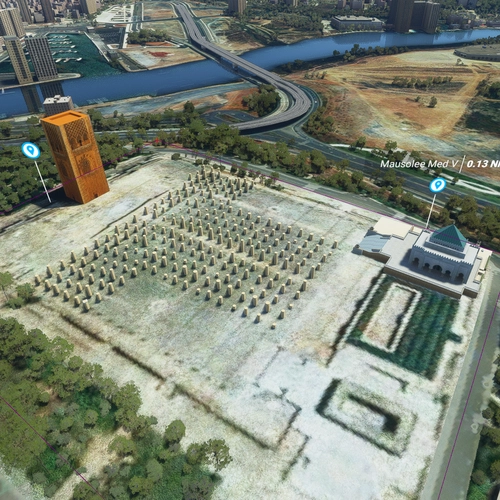
Explore the beautiful city of Rabat, Morocco with this scenery add-on featuring famous landmarks like Tour Hassan and Mausolée Med V. Enhance your flight simulation experience with detailed replicas of Musée Med VI, Stade de Rabat, and even the animals at Rabat Zoo. Simply copy the extracted file into your community folder to enjoy this immersive scenery.
von Adil Hadri
Melden Sie sich an, um an der Diskussion teilzunehmen
AnmeldenKommentare(29)
14 days ago
about 5 hours ago
23 days ago
Also, in V2, it can no longer zoom in as much as V 1. seems like a intentional downgrade.
14 days ago
Dieser Kommentar wurde gelöscht
4 months ago
Excellent work with the app, btw. It works fine
5 months ago
2. INSTALLATION
-----------------------------------------------------------------------
1. Locate your Microsoft Flight Simulator 2024 "Community" folder.
- PC Store: %LocalAppData%\Packages\Microsoft.Limitless_8wekyb3d8bbwe\LocalCache\Packages\Community
- Steam: C:\Users\[YourName]\AppData\Roaming\Microsoft Flight Simulator 2024\Packages\Community
2. Extract the contents of the downloaded ZIP file.
3. Copy the folder named "SimWikiMap" directly into
your Community folder.
4. Ensure the structure looks like this:
/Community/SimWikiMap/manifest.json
/Community/SimWikiMap/layout.json
3. HOW TO USE
-----------------------------------------------------------------------
1. Launch MSFS 2024 and start a flight.
2. Open the Tablet and look for the "SimWikiMap" icon on the home screen.
3. Once the map loads, you can click on any city, town, or airport
to trigger a "Scan."
4. A panel will slide up with Wikipedia information, photos, and
technical details about that location.
5. Click the "NEWS & SUPPORT" button at any time to see the latest
updates or support information.
7 months ago
https://flightsim.to/addon/86883/efb-msfs2024-vfrnav
7 months ago
7 months ago
7 months ago
7 months ago
7 months ago
Any ideas?
7 months ago
7 months ago
7 months ago
7 months ago
7 months ago
7 months ago
7 months ago
7 months ago