
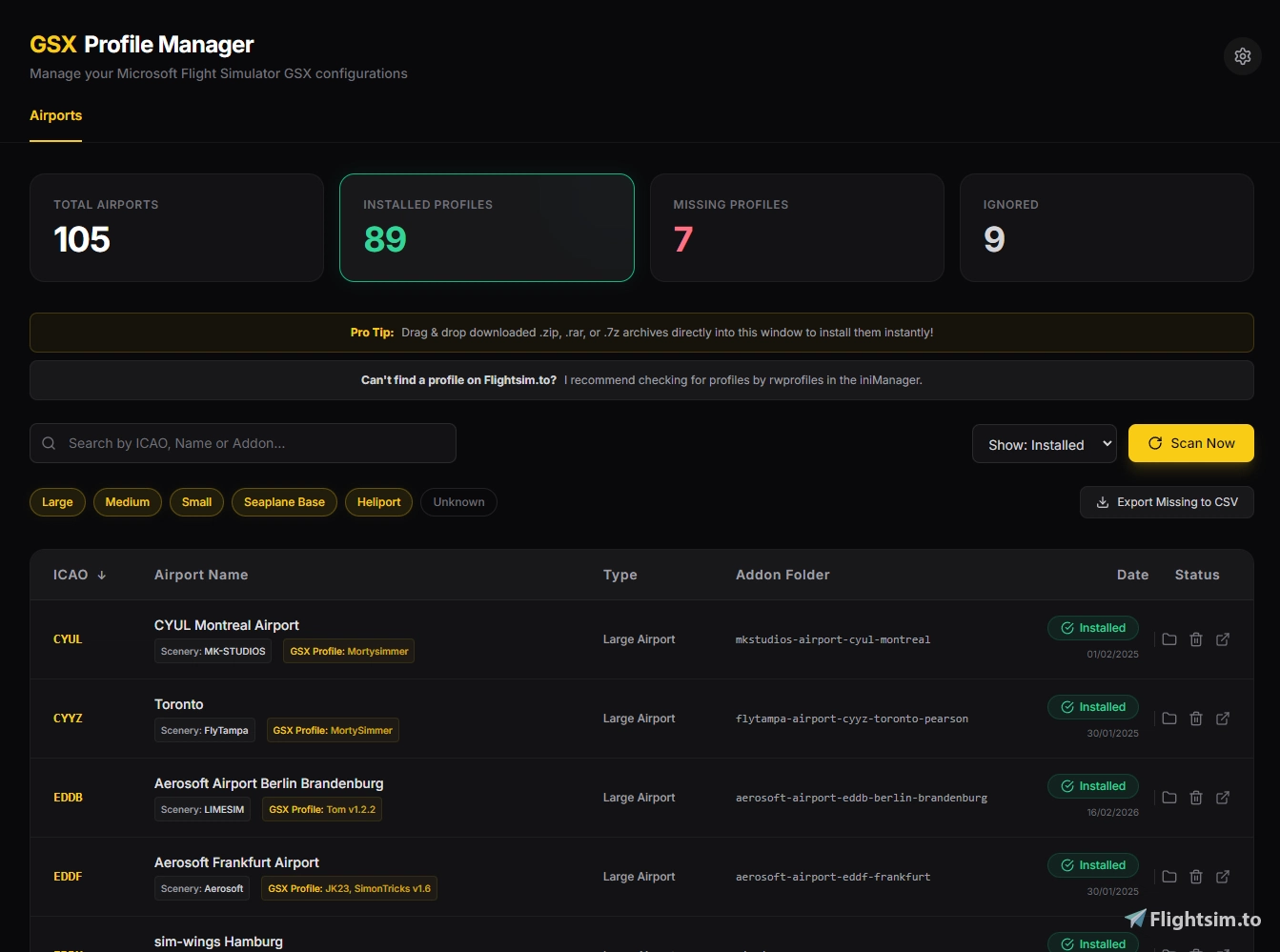
Beschreibung
A standalone desktop tool that scans your MSFS Community folders and cross-references your installed addon scenery against your active GSX Pro profiles. It identifies which airports have configurations installed and which ones are missing as well.
I would like to allow users to download GSX profiles directly from the manager, but due to flightsim.to API limitations, this is not possible. Thus a button to take you to flightsim.to with the ICAO for the relevant airport pre-searched in GSX Profiles is what I've done.
Bugs will be present no doubt, so don't hesitate to dm me at 'fsdave.' on Discord if you find any 👍
Some miscellaneous sceneries may be classed as airports, like tree removal or static object sceneries. Not much I can do about these as it's quite difficult to filter these out depending on how the developer has configured their package.
https://github.com/DaveGaming01/davesgsxprofilemanagersource
Dave's GSX Profile Manager
Dave's GSX Profile Manager is a desktop tool for Microsoft Flight Simulator that scans your Community folder to match installed scenery with active GSX Pro profiles. It shows which airports have GSX profiles installed and which are missing them. The tool provides a direct link to relevant downloads on flightsim.to using ICAO pre-search. Note that some non-airport sceneries may be identified as airports depending on their configuration. https://github.com/DaveGaming01/davesgsxprofilemanagersource

Nutzerbewertungen
79 Bewertungen
Versionsgeschichte
CHANGELOG - v1.0.4 FIXED - Airports not being detected at all - The scanner now reads InstalledPackagesPath from each simulator's UserCfg.opt instead of only probing the default AppData locations. If you moved your MSFS packages to another drive, your Community, Official and StreamedPackages folders are now found automatically. Previously, a relocated install could report zero Marketplace and zero Streamed airports - and on some setups zero airports entirely - unless you added every folder by hand. - Non-standard folder layouts are now handled: Official, Official2020, Official2024, OneStore, Steam, Community, Community2024 and StreamedPackages are all detected by name. - Marketplace and Streamed airports no longer require a hit in the airport database to be recognised, so they keep showing up even if the reference data can't be downloaded. - Fixed the airport database column mapping. The upstream data gained a column, which meant the alternate-code lookup was reading web links instead of airport keywords. Columns are now resolved from the file's own header. - A clear warning is now shown if the airport database is unavailable, or if no simulator folders could be found at all, instead of silently showing an empty list. - Settings now lists every simulator folder that was detected, tagged with the sim it belongs to and whether it is a Community, Official or Streamed folder, so you can confirm what is being scanned. - A Community folder you add by hand is once again used to find the Official and StreamedPackages folders sitting next to it, so Marketplace and Streamed airports are found even when UserCfg.opt is missing or points somewhere else. - Disabled and backup add-on folders (Community-BACKUP, CommunityDisabled, Official-old and similar) are no longer scanned as if the simulator were loading them. FIXED - Drag and drop appeared to do nothing - Installing a profile for an airport with no matching scenery add-on now creates a row in the list, tagged "Profile only". Previously these profiles installed correctly but were invisible, so dropping the same file again would surprise you with an overwrite prompt. - After any install, the list clears its filters, scrolls to the airport you just installed and highlights it, so you can always see what happened. - The GSX profiles folder is created if it doesn't exist yet. FIXED - Profiles using GSX's newer vehicle path feature - The profile parser has been rewritten. It now understands the multi-destination "pushbackaddpos" format, ordered pushback approach waypoints, and the vehicle path data written by the newer GSX path editor: baggage loaders, baggage trains, stairs, catering, passenger and walker routes, and docking system positions. - Parking positions named with any standard MSFS parking type are now read correctly. Previously only Gate, Parking, Ramp and Pad with L/R suffixes were understood, so stands such as "E Parking 1", "Gate A 12", "NE Parking 3" and "Dock 2" were silently dropped. - Author-named sections such as custom de-icing lanes are now listed as Custom Areas instead of being ignored. - Python profiles are parsed with proper brace matching. Modern profiles contain nested data, which used to truncate the parking list part-way through. - Stands that a profile references without moving now still appear on the map, positioned from the nearest available profile data and marked as approximate. - Positions defined in both the .ini and .py of the same profile are now listed once instead of twice, and are sorted naturally so Gate 2 comes before Gate 10. - The analyser gained Vehicle Paths and Custom Areas counters, a vehicle path column, and draws vehicle and passenger routes on the map in cyan alongside the orange pushback paths. FIXED - Airport counters - Total, Installed, Missing and Ignored now describe exactly what the table is showing. Hiding Streamed or Marketplace airports, or filtering by continent, country, type or search, updates the counters to match. Clicking a counter still filters the list without changing the other numbers. NEW - Which simulator each airport belongs to - Airports are tagged MSFS 2020 or MSFS 2024 based on which simulator's folders the scenery was found in. An airport installed for both sims shows both badges on one row. - Added a "Sim" filter to show only MSFS 2020 or only MSFS 2024 airports. Airports that can't be attributed to a sim - profile-only entries and add-ons in unrecognised folders - stay visible under either choice rather than silently disappearing. - Airports found in more than one folder are now a single row rather than one row per folder, with a "+N" marker showing how many add-on folders were found. NEW - Keyboard shortcuts - F5 or Ctrl+R rescans. Ctrl+F jumps to the search box, "/" does the same, and Escape clears the search or closes the open dialog. The window no longer reloads on F5. NEW - SimBrief panel - Installed airports now have their own "check for updates" button linking to Flightsim.to, next to the existing analyse button, so you no longer have to retype each ICAO into the search box. - Airports with no scenery installed also get a search button. OTHER - Added a "Closed" airport type filter. Closed airports previously had no toggle and could never be shown. - Fixed Asobo package ICAO detection. Package names are read positionally, so "fs24-asobo-airport-fxme-maketane" resolves to FXME rather than FS24, and "asobo-airport-c53-lowerloon" to C53 rather than LOON. - Fixed the select-all checkbox reporting itself as checked when the selection count merely matched the number of visible rows.





Melden Sie sich an, um an der Diskussion teilzunehmen
AnmeldenKommentare(161)
about 6 hours ago
1 day ago
2 days ago
7 days ago
13 days ago
Only issue I come across: when I click on the little "analyse profile" icon, a map opens up shwoing gates, but nothing else. It says that an API key for carto is required. See enclosed picture.
Anything I need to do?
Thanks!
17 days ago
18 days ago
23 days ago
25 days ago
about 1 month ago
29 days ago
about 1 month ago
about 1 month ago
Any plans to update the map when looking at a gsx profile so fix the API key missing message?
about 2 months ago
about 2 months ago
2 months ago
3 months ago
3 months ago
3 months ago