About this addon
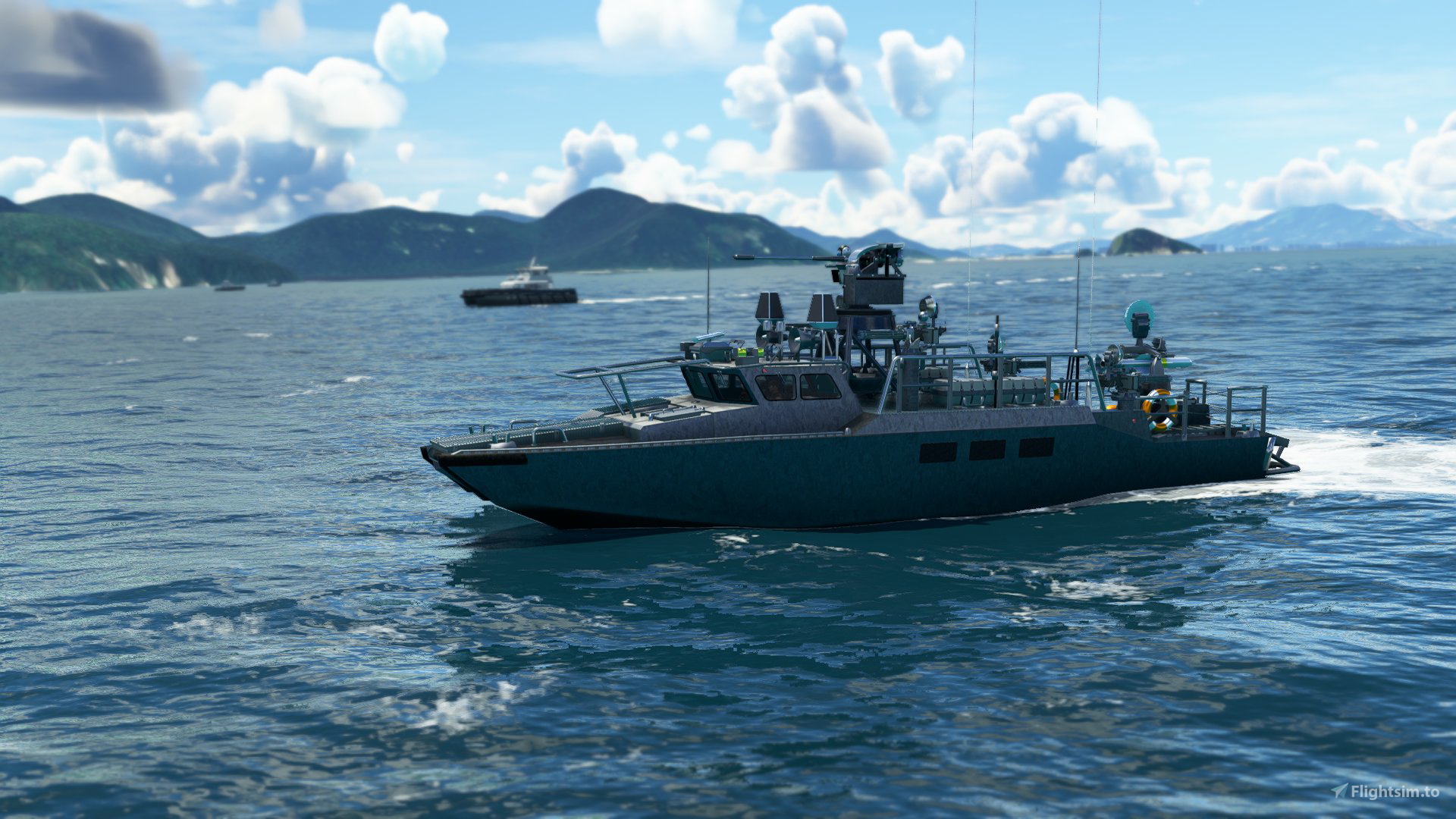
Coming to Microsoft Flight Simulator an amazing Warships pack with 3 highly detailed controllable ships in the game. The ships have moving fire turrets, navigation system, animations, bridge, characters, sounds, smoke particles and water waves. They are: Litoral Combat Ship Class Buyan, Japanese Destroyer JS Kongō Class DDG-173 and Battleship North Carolina BB-55.
RESOURCES:
- Detailed interior
- moving fire turrets
- Start anywhere in the world over water
- Night lights
- Water trails instantly when on the go
- Sounds
- Smoke particles
- Friendly fps
INSTALLATION SIZE:
- Total download file - 556mb
HOW TO INSTALL:
- Locate the Microsoft Flight Simulator installation folder
- You need to find and open the folder called Community
- Copy the three folders "Marine RM Litoral Combat Ship", "Marine RM Destroyer DDG-143" and "Marine RM Battleship BB-55 North Carolina" you just extracted into the Community folder
- Start the game and the Litoral Combat Ship, Destroyer DDG-143 and Battleship North Carolina BB-55 ships will be in your hangar ready to sail!
HOW TO PLAY:
Start the game at the headland of some seaplane runway, put the engine on 100% and wait a few seconds for the ship to start moving. The water trails and smoke will start with the slowest speed you are on the Destroyer and Battleship. These ships do not have a reverse engine for the time being, but this will be implemented in an upcoming update. Click L to activate an overnight navigation beacon. Quickly activate and deactivate the landing gear to honk. It is possible to start anywhere in the world on water, read the last paragraph of the following section to understand how.
IMPORTANT TO KNOW:
- This add-on will continue to be developed for improvements such as: Interior improvements, functional gauges, improved navigation physics and corrected lighting in Battleship. Soon all models will receive this and more updates.
- The amount of water trails is limited by Asobo for now, when this limitation is removed from the SDK boats will have more sprays on the front and sides.
- The speed of all boats is limited to less than 30kts for water stability reasons.
- When starting the departure, the ship may appear stuck in the water or sinking. This is because the SDK does not recognize the 3D model of the boat as an entire object, regardless of the contact points. For now, a solution to this is to press the "Y" KEY to enter and press it again to exit Yoke Mode to correctly position the ship in the water. This will definitely be improved soon.
- Don't start cold, a boat's starter function is unrealistic without a panel.
- Water waves can start out "hard", with a strange texture. This changes gradually during the game, when turning in any direction.
Changelog
CHANGELOG v1.4: All 3D models of the ships have been redone Added updated navigation physics, with sea wave rocking on all ships Added high-speed physics on the Mark VI Patrol Boat, making the boat's nose lift in comfort gain speed - Important Note: due to the impossibility of attaching a main camera, it is necessary to manually raise or lower the pilot's view when the boat is fast.
UPDATE v1.2 - DDG-143 DESTROYER IMPROVEMENTS: Addition of hard deck on the helipad Adding anchor chain Adding mooring ropes Improved night lights Improved navigation model
CHANGELOG V1.1: Added new Patrol Boat Mark VI vessel Improved average ship speed
User Reviews
CHICKENSTRIP23
VerifiedSep 3, 2026
Give the Creator some time, So far he just recently updated a few ships that were only 2020. We will soon see this one updated too

Aussie.Dave
VerifiedFeb 18, 2024
***UPDATED COMMENT***: Still no updates. Not surprised. While the ships look great, navigation is impossible and they don't hold course. Would be great if the designer did upgrades to product.

lonnyll
VerifiedJul 6, 2023
"We thoroughly put every product through its paces before making it available to customers." It's good for you there are no refunds. LOL
whocoolich
VerifiedAug 29, 2022
Navigation system still not working, nav screens remain blocked if you click on them. You must do something! Told you 100 times. :( Oh wait, you are busy to upgrade and raise others pack for profit. Nice work, but step by step looks like a little bit scamm. Fix them or leave it, ffs!
This may not be a problem with the mod. I trust you've reset your keyboard/mouse/etc. saved control profiles back to Default and recreated what you need? Have you followed the recommended fix for blacked out avionics shown at https://www.flightsimulator.com/known-issues/ ?
jafergon
VerifiedApr 12, 2022
I really like this package! Only a simple suggestions. Would it be possible to remove the glass materials in the windows from the bridge view so they are completely transparent? the reflections of the cubemap are a bit annoying in VR and change too much the appearance of the outside world. Thanks!
Warships Fleet Pack
Discover an amazing Warships Fleet Pack for Microsoft Flight Simulator featuring 3 detailed controllable ships with moving turrets, navigation systems, animations, and more. Explore the Litoral Combat Ship, Japanese Destroyer JS Kongō Class DDG-173, and Battleship North Carolina BB-55. Installation size: 556mb. Additional updates in development will enhance interior, gauges, and lighting.

Instant digital delivery • Secure payment
Requirements
Additional Requirements
Minimum system requirements for Microsoft Flight Simulator 2020
- CPU: Intel i5 9600K.
- RAM: 16 GB.
- OS: Windows 10 64-bit.
- VIDEO CARD: NVIDIA GTX 1050 Ti.
- PIXEL SHADER: 5.1.
- VERTEX SHADER: 5.1.
- DEDICATED VIDEO RAM: 2 GB.
- STORAGE: HDD.
More by this publisher
Details
- Category
- Aircraft
- Release Date
- Mar 29, 2022
- Last Updated
- Oct 13, 2022
- Reviews
- 5
- Compatibility
- MSFS2020