About this addon
Gees: Landing Analysis Addon for Microsoft Flight Simulator 2020
Check the Full Flight Tutorial here: https://www.youtube.com/watch?v=ITFMpFMP-vc
Important Information - MSFS2024 Compatibility
The app is partially compatible with MSFS2024. Core functionality works, but I'm not happy with the UI and non-core features.
I’m working on a unified update for MSFS2020 and MSFS2024, though compatibility challenges remain. If a separate app for MSFS2024 is necessary, it will be offered as an upgrade for existing GEES users.
Current Screenshot: https://imgur.com/a/FP8en8Y
If Using in MSFS2024: Replay can function as in legacy MSFS2020. However, with Flight Control Replay now default in MSFS2024, if you want to use this, disable auto-replay to avoid conflicts. Feedback is welcome, but please don’t rate the app for MSFS2024, as it’s not fully compatible, especially the replay function. Thank you!
How was my last landing?
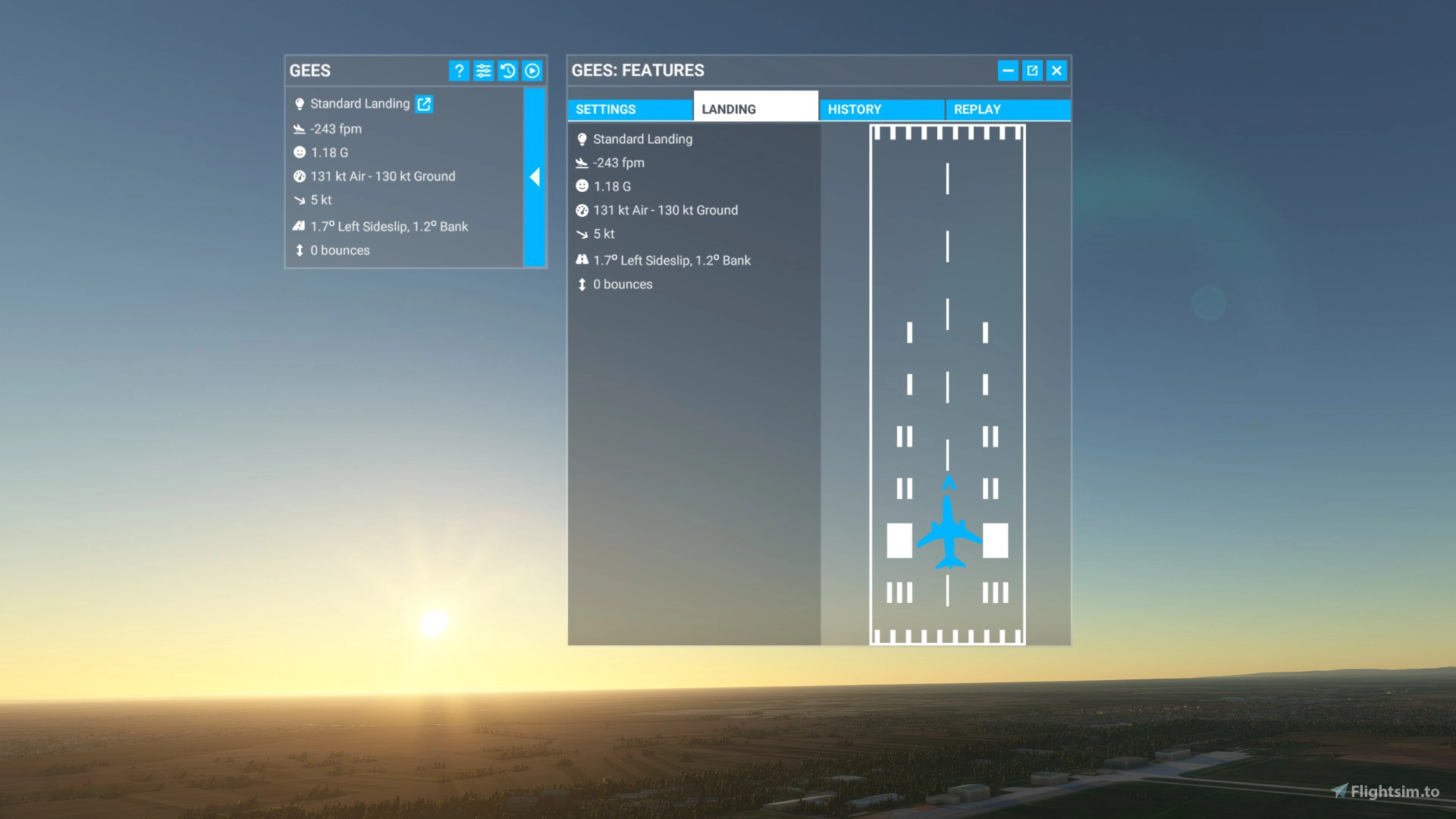
MSFS 2020 is awesome, but it still cannot kick you in the butt and push you to the side upon landing to describe how your landing was. Gees tries to fill in that gap, providing all the details about your landing skills.
Landing Analysis:
Here's what you'll get:
- Landing Rate: Did you get a "fifty, twenty, ten... five... come on ..." or a "one hundred, fiftytwentytenthump... uh... can you check in the back, if the wings are still attached to the plane?"
- G-Force: Are the passengers still unsure if you've landed, or looking around nervously, wondering "is this how it ends"?
- Landing Speed: Similar to landing rate, but in a forward direction.
- Wind Speed and Direction: Did you just land at an untowered airport with a 15kt tailwind?
- Sideslip and Bank: How are your crosswind landings? Did you manage to keep that poor Cessna straight?
- Bounces: How many times did you actually land?
- Landing Location: Did you hit the sweet spot, or end up in the nearby parking lot?
Instant Replay:
Finally, once you've nailed a greaser, right in the middle of the touchdown zone, you forgot to switch on the instant replay recording to see it.
If you enable it, Gees starts and stops the recording for each landing, so you can marvel at your capabilities as a sim pilot.
Installation:
This is an in-game MSFS addon. It does not require the 20th exe file you start before MSFS to access the simple panel.
Installation is done by copying the files into the Community folder.
All the dialogs, settings, and displays are in-game and can be started, stopped, enabled, or disabled from the sim itself.
Notes:
- The app needs to run to record the landing. There's no close button, so you won't close it by accident. Minimize it, and it will move away from view. Starting and stopping is done by clicking the icon in the top menu bar.
- You can control how "intrusive" the app will be. It can stay visible all the time, or hide and wait for you to open it.
- Landing location is tricky to obtain from the game, as the sim needs to know where you intended to land. As of now, this can only be done using the in-game ATC. Alternatively, you can look back at the instant replay to see the landing location.
- MSFS' replay has its own quirks. There are quite a few of them, and it is what it is. If you've used the in-game one (still noted as experimental), you'll understand. Polishing all these quirks is a big task, and it would shift the focus of this app from landings to replays, so we have to live with them for now.
- History is limited to 100 landings. Storing a lot of data within the sim is a concern. One of the future updates might address exporting this data if there's a demand for it.
Known Issues:
- Users who have set a very high "Minimum Text Size" in their accessibility options may experience a visually distorted interface. However, in vast majority of cases, if the other menus appear typical, the app's appearance will also be normal.
Although developed by the same author, this is a completely separate app from the original, free, and open-source Gees app (Here). It's much more streamlined, in-game app, and comes with more features. When reporting bugs and requests, please specify which app you are referring to.
User Reviews

JimOxide
VerifiedAug 30, 2026
Works fine in MSFS 2024
dluhowy
VerifiedFeb 7, 2026
Really good
ZackFinder
VerifiedFeb 4, 2026
A fabulous addition for MSFS. It auto-installs seamlessly into the interface; just place it into the community folder. It honestly looks like it belongs on the MSFS display. The readout after each landing is automatic and unobtrusive. It greatly aided my ability to improve my landings!
rickkeen
VerifiedFeb 1, 2026
Need to check the headwind and crosswind stats being reported - the headwind and crosswind columns appear to be swapped. For example, landing on runway 23 at KFMY, wind was straight-on headwind 236 at 8. GEES reported -1 headwind and -9 crosswind which is flipped. Other requests: Please, please, please just make it always running. When repeatedly practicing landings, having to click to open GEES each time is an extra step. Also, please have it show the landing position down the runway and distance from centerline in the stats history. Also a column for bank angle at landing. Finally, would be nice to have the stats history exportable to a spreadsheet as CSV so can take stats and chart improvements.
KrisA2896
VerifiedJan 26, 2026
the best landing analysis tool that i ever used!
HarryStama
VerifiedDec 20, 2025
Any chances to seeing an update refined for FS2024? That would be great.
seippg
VerifiedOct 28, 2025
Had a problem figuring it out. Had to turn on Auto Replay. Then it worked a champ! Looking forward to the replay option in FS2024.
Elliot_010699
VerifiedAug 10, 2025
muy util para generar registro de tuis aterizajes y asi poder mejorar
HomerJ666
VerifiedAug 6, 2025
Works great in FS2020. With the Fenix in FS2024 it causes CTD. Hoping for an update to fix this
Denny_T
VerifiedAug 4, 2025
Why doesn't it work in career mode? I spend almost 90% of the game there. Disappointed. Write in the description that career mode is not available for this program.
Nasgold77
VerifiedApr 27, 2025
Great product. Simple and easy to analyze landing. I highly recommend.

Xonarous
VerifiedMar 27, 2025
Even tho its not officially supported for 2024 yet, its a addon i can highly recommend, it just works!
did the dev abandon this app? i see the last update was more than a year ago

Thanks Xonarous! to reply to alan: Definitely not abandoned — I'm just being cautious about introducing new things. I try to keep this "it just works" approach. Every new thing in software comes with the risk of introducing issues, and I’d rather avoid that than make changes just for the sake of appearing active. This ties into the FS2024 topic as well. I’m hesitant to officially commit the app to FS2024 support just yet — my goal is to make it compatible with all the new features (like instant replay) and to make it feel native to FS2024. But that’s tricky at the moment unless I start from scratch with a new app. And I don’t want to build and sell a separate app just for FS2024, so I’m waiting to see how things develop. Until then, this app is a piece of MSFS2020 running in MSFS2024. But the MSFS2024 is a weird hybrid now, and I'm not quite sure what to do. It might seem a bit old-fashioned, but I'm a one-man show, and that makes it much harder to test and tweak things on the fly. So I prefer to keep things stable.
Uzi3x3
VerifiedFeb 27, 2025
Can i use it for Career Mode aswell?

abaza738
VerifiedFeb 23, 2025
I love the landing analysis! Thank you very much for this product!
Loben
VerifiedFeb 3, 2025
Great product in MSFS2020 I believe it is a source of CTD on 2024 so I'm just waiting on a update!
Choco
VerifiedJan 28, 2025
Excellent soft et le prix est vraiment très raisonnable merci mille fois. suggestion: it would be ideal if the features menu 'which contains the different flights', could be retrieved as a text file, which could be used to copy into a pilot logbook.
Asablinpat
VerifiedJan 14, 2025
This is a very interesting product. I continue to explore the different possibilities. But already it meets my expectations
ianmert
VerifiedJan 11, 2025
Great product and well worth getting.

Jojo1887
VerifiedJan 9, 2025
GREAT,i love it.
megatang
VerifiedJan 4, 2025
I like GEES 2.0 very much and would like to recommend it to other players who want to check their landing posture. GEES 2.0 brings me a lot of fun. My favourite feature is the landing replay, so I can enjoy the entire landing from a passenger's perspective. Well done! At the same time, I look forward to GEES 2.0 having the same excellent performance in MSFS2024 in the future!
cessna152_2024
VerifiedDec 27, 2024
phenomenal plugin, natively rendering the landing stats on each landing - including automatic recording of the last 500ft of descent. I love how it shows the touchdown on the runway, as I tend to land a bit left of center. The plugin natively embeds in the top menu of the sim. Wonderful work!
dokks
VerifiedDec 19, 2024
Exactly what I was looking for. One thing I would LOVE to be able to export the data to a spreadsheet to track my progress.

i3su
VerifiedOct 20, 2024
4½ stars! I purchased this as I wanted the landing rate to work seamlessly within MSFS rather than externally, especially given how many applications already need to be run externally, and I have to say it works really well. The UI is pretty easy to understand and I love that you can essentially hide it away until it pops up on your landing. I also really appreciate the accuracy of the landing rate, as knowing I've nailed a landing and having it shows on GEES, but having almost 100fpm more on something like Volanta, can feel somewhat vindicating! :) It loses half a star as whilst I appreciate the integration of a replay function, it just doesn't really work in its current state. If there is a way to partner and/or integrate with a 3rd party replay application (far superior) then that would be absolutely ideal, but in its current state it just isn't worth using at all! Other than that though, very happy with this purchase! :D
JoGi
VerifiedAug 30, 2024
All you need at a fair price :)
mazak234
VerifiedJul 12, 2024
I bought this addon specifically because it runs within the sim, not in a separate window which I wouldn't see in VR. From the VR perspective, the Landing Analysis feature is great - really useful, easy to use, and works as intended. Unfortunately the Replay feature is not useful at all in VR. When I load a replay, it starts on a "flat screen preview" inside an empty VR environment (the same way as the MSFS main menu looks in VR), with the camera set to 1st person view and my head movements recorded as well, so when I watch a a replay I can't look anywhere else than where I was looking while recording it. On top of that, while the replay is playing, I have no visible controls so I can't change the camera to e.g. 3rd person view and, what's more problematic, when the replay ends I can't turn it off - it just stays on the last frame and I need to restart the flight or turn off VR mode (which always generates technical problems for my Reverb G2 so do my best to avoid it while MSFS is active). I know the Replay features was mentioned as "experimental" but imho the product description should mention clearly that it's not usable at all in VR.
N6112
VerifiedJul 3, 2024
confused that landing rates not matching in all my apps. GEES is different than Volanta which is different from FSiPanel. Which one is right? And we are talking that they are not in the same ball park..
This app reads from the MSFS itself the "landing rate" value and displays it. It takes into account the runway slope and everything. Best way to test the apps is to try a landing challenge, and check the result. Gees will match the output from the game. For the other apps, I cannot answer how the landing is calculated, I guess its a question for the developers of the said apps.

drgrundlos
VerifiedJun 24, 2024
funktioniert herrvoragend! Tolles Addon
anps
VerifiedMay 18, 2024
Works great, thank you! It's just always there when I start a flight and works as intended whenI land. Love the automatic replay recorder. Would be great if it worked for helicopters
Thanks! Helicopters are a bit tricky but I might include them at some point.
JOx12
VerifiedMar 30, 2024
I have the beta version of msfs. Bought it and it doesn't work for me. Tested with Fenix A320 and FSR M500.
Hi, if you have some more information, please send me a message to check what could be the problem. Is it because of the Beta MSFS?
Juicyrush
VerifiedFeb 25, 2024
Unfortunately, landing location does not work for me, it is necessary to use built-in ATC which is crap, I use payware ATC (so built-in ATC is switched off completely via menu), but sometimes I just want to practice landings and not to use ATC at all as it is nonsense. Somehow, the landing location works without ATC in other apps such as FSI panel and Simtoolkitpro. Hopefully, location will be added in the future without ATC requirements.
I agree, however this is how it has to be at the moment, as this is not a flight planning tool (with which you're comparing). I just look at the parameters and then calculate the landing generally, so there's no way I can know where you plan to land beforehand, and where you did except what I can read from MSFS, without an external database of all the airports. And sim only "acknowledges" the in-game ATC for now.
glowing
VerifiedFeb 12, 2024
I mean what is there to say that is bad about this addon? It has everything necessary and gives a lot and I mean a lot of statistics about your overall landing. From a replay feature, to a passenger rating, there is nothing this addon doesn't have wrong.

Odair
VerifiedFeb 12, 2024
Gostei muito
hkogge
VerifiedFeb 4, 2024
Very cool add-on! Was already a fan of the freeware version, but this one is even better! I think it just works smoother, integrates better into the sim and provides some additional useful insights. I did a couple of flights and it worked like a charm. I especially like the feature to review the landing location! I haven't tested the record/replay part of the add-on yet, but even without it, it greatly enhances my sim experience. It's just super satisfying when you feel like you buttered your landing and can prove it by numbers! :D
Thanks man!
Nodone
VerifiedFeb 4, 2024
Works great, thank you! This should have been a default feature in the game! Wish there were more camera views for replays (seem to only be able to use cockpit or lock third person view).
You can try the default camera app. Just start the recording, and then start the app, you can do some nice views. Needs some experience though... Check the tutorial for how to use it, and you can use it also during the replay: https://www.youtube.com/watch?v=uaemiMPUMsQ&t=0s
to move your camera around whilst replaying, there is an option to record the camera track, click that. It doesn't actually do anything nor save data just it allows your camera move and use the other camera views.
dalefltsim
VerifiedJan 30, 2024
I use a reverb G2 for VR. It uses windows WMR as a driver app. The new Ver 1.0.1 Gees MSFS add-on app worked just fine in VR. The small window with the landing results data appeared and was moveable. It retained the last landing data until I made a new landing. The secondary larger window with the aircraft touchdown position on the runway also appeared in VR (got to work on my slide-slip tendencies). I did not try Replay. This version of Gees gets a thumbs up from me
Thanks! Glad you like it! For the replay... It's still an experimental in-game feature, and if you replay it while in VR, I found it not to be great. Much better to switch off the VR when replaying the landing.
GEES 2.0 Landing Analysis for MSFS
Enhance your landing skills with GEES 2.0 Landing Analysis for MSFS. This in-game add-on provides detailed feedback on your landing rate, G-force, speed, wind conditions, sideslip, bounces, and landing location. It also offers instant replay recording to review your landings and can be easily installed by copying files into the Community folder. Improve your piloting abilities and track your progress with GEES 2.0.
Instant digital delivery • Secure payment
Requirements
Additional Requirements
- Microsoft Flight Simulator 2020
Details
- Category
- Utilities
- Release Date
- Jan 21, 2024
- Last Updated
- Jan 26, 2024
- Reviews
- 35
- Compatibility
- MSFS2020