About this addon
Aerosoft A340-600 Autopilot Profile
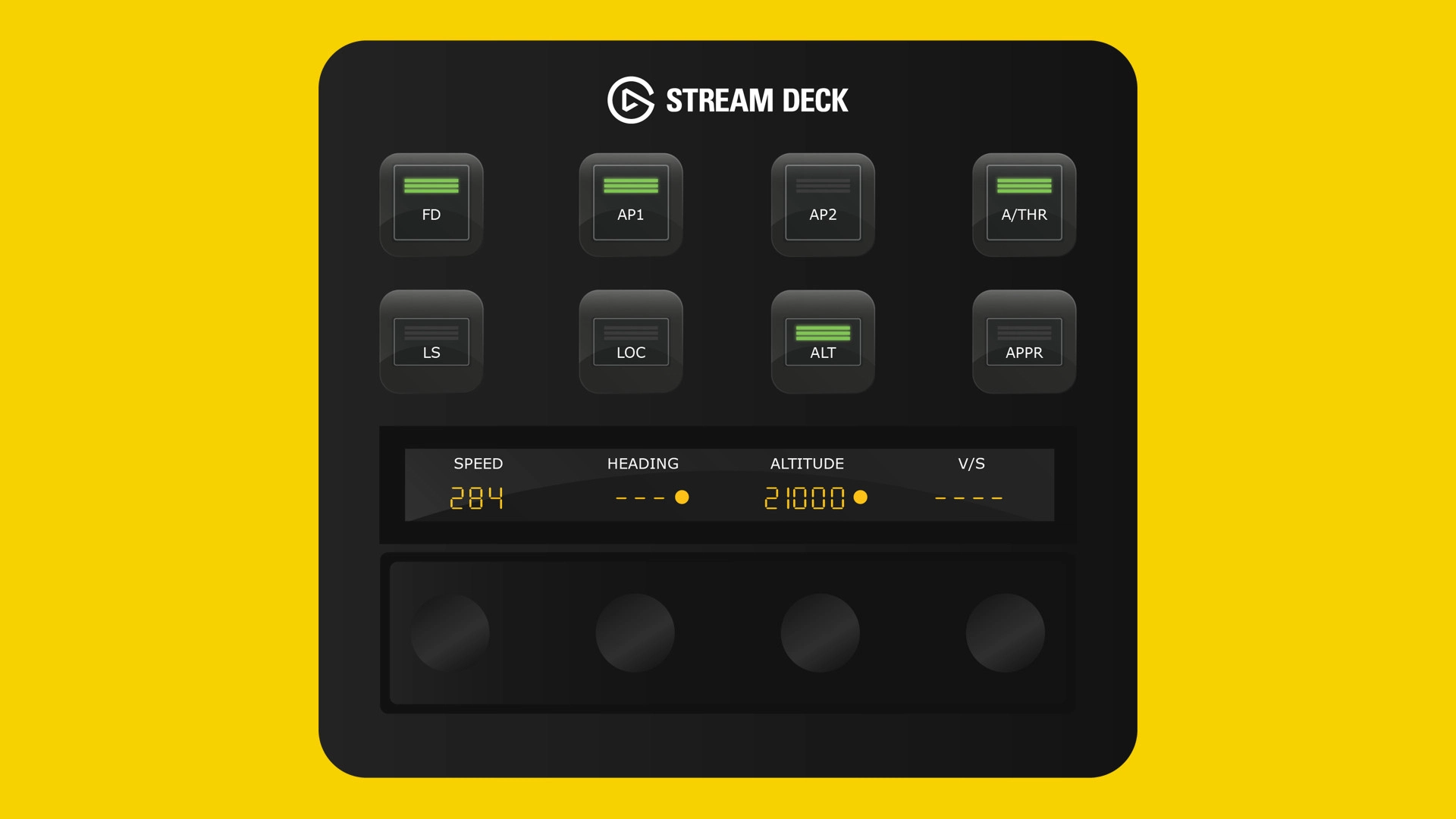
With the Flight Panels Autopilot Profile for the Aerosoft A340-600, you can control autopilot, communications, navigation, EFIS, transponder, internal lighting and more, all from the Stream Deck +’s physical buttons, LCD touchscreen and rotary dials.
Watch speed, heading, vertical speed, altitude and frequencies update in real time as you turn the dials, adding a new level of realism to your flight simulation experience.
For a comprehensive list of features and functionality (which may vary between aircraft), please see below.
Flight Control Panel 1 (FCP)
Button Controls: Flight Director (FD), Auto Pilot 1 (AP1), Auto Pilot 2 (AP2), Auto Throttle (A/THR), LS, LOC, APPR, ALT. Rotary Dials & LCD Screen: Real-time values for speed, heading, altitude, and vertical speed. Rotate the rotary dials left or right to increase or decrease values.
Speed: Press the rotary dial to toggle SPEED Selected/Managed mode, tap the screen to toggle SPD/MACH. Heading: Press the rotary dial to toggle HDG Selected/Managed mode, tap the screen to toggle Heading/Track mode; Altitude: Press the rotary dial to toggle Altitude Selected/Managed mode or tap the screen to toggle 100/1000 increment; Vertical Speed (V/S): Press the rotary dial to toggle VS mode or tap the screen to level off.
Flight Control Panel 2 (FCP) / Communications
Button Controls: Flight Director (FD), Auto Pilot 1 (AP1), Auto Pilot 2 (AP2), Auto Throttle (A/THR), LS, LOC, APPR, ALT. Rotary Dials & LCD Screen: Real-time frequency values for COM1/COM2 (Active and Standby). Rotate rotary dials 1 and 2 to change the standby frequency for COM1 and dials 3 & 4 for COM2. Tap the screen or press a standby rotary dial to swap between Standby and Active.
Navigation
Button Controls: Flight Director (FD), Auto Pilot 1 (AP1), Auto Pilot 2 (AP2), Auto Throttle (A/THR), LS, LOC, APPR, ALT. Rotary Dials & LCD Screen: Real-time frequency values for NAV1/NAV2 (Active and Standby). Rotate rotary dials 1 and 2 to change the standby frequency for NAV1 and dials 3 & 4 for NAV2. Tap the screen or press a standby rotary dial to swap between Standby and Active
Transponder
Button Controls: Flight Director (FD), Auto Pilot 1 (AP1), Auto Pilot 2 (AP2), Auto Throttle (A/THR), LS, LOC, APPR, ALT. Rotary Dials: Rotate the rotary dials to increase or decrease each of the transponder digits. Tap the screen or press a rotary dial to synchronise the cockpit display.
EFIS
Button Controls: MACH/SPD, CSTR, WPT, VOR D, NDB, ARPT, HDG V/S, Metric. Rotary Dials: Real-time values for EFIS Mode, EFIS Range, and Captain / FO Baro. Rotate the rotary dials left or right to increase or decrease values. Baro: Press the rotary dial to toggle STD mode or tap the screen to toggle HPA/InHg.
Lighting
Button Controls: Strobe, Beacon, Wing, Nav, Runway Turnoff, Landing, and Taxi. Rotary Dials: Rotate the rotary dials to increase or decrease light intensity.
About Flight Panels
Our mission is to become an integral part of any Microsoft Flight Simulator setup, through the creation of professional, highly detailed, modern and consistency designed Stream Deck profiles, which maximise the immersive experience of Microsoft Flight Simulator. Our focus on user design, user experience and product research, backed by regular product updates and dedicated industry leading support - is there to provide our community with the confidence that a key part of their Flight Simulator setup will be regularly updated and supported.
Frequently Asked Questions
Q: Do you provide regular product updates?
We regularly update our Stream Deck Profiles to include new features, functionality and bug fixes and we're delighted to provide these free of cost, for the duration of the products lifespan. Announcements are also published on our Discord server and Release Notes are available on our product updates blog.
Q: What if I need support?
We provide free industry leading support by email (support[at]flightpanels.io), Discord and Live Chat (available on the bottom right hand corner of each webpage). On average, we respond to support requests in less than 15 minutes!
Q: How are your products installed?
Installation is performed through the Flight Panels All-In-One Installer, which automatically installs and configures third party applications (FSUIPC7, PilotsDeck, .NET Runtimes etc.) to make installation a breeze.
Q: How is the product licensed?
This product is for personal and home use. For commercial use and/or where used to generate revenue (directly or indirectly) a commercial license is required. Please contact support[at]flightpanels.io for further information.
Q: How can I keep up to date with the latest news?
Blog: https://flightpanels.io/blog/news
Product Updates: https://flightpanels.io/blog/product-updates
Support Portal: https://support.flightpanels.io
Instagram: https://instagram.com/flightpanels
Threads: https://threads.net/flightpanels
Discord: https://flightpanels.io/discord
Changelog
Release Notes: https://flightpanels.io/blogs/product-updates/code-signing-certificate-updates-2026
User Reviews
No reviews yet. Be the first to share your experience!
Aerosoft A340-600 Autopilot Profile
This add-on provides a comprehensive autopilot profile for the Aerosoft A340-600, designed for use with the Stream Deck Plus. It enables control of autopilot, communications, navigation, EFIS, transponder, lighting, and more through physical buttons, rotary dials, and a touchscreen interface. Real-time data updates allow for seamless adjustments of key flight parameters. The profile is installed via the Flight Panels All-In-One Installer and receives regular updates and support.

Instant digital delivery • Secure payment
Requirements
Additional Requirements
- Stream Deck +
- Microsoft Flight Simulator 2020/2024 (Steam or Microsoft Store)
- The aircraft referenced in the product description
More by this publisher
iFly 737 Max 8 Stream Deck Profile
Miscellaneous
31,78 €
AeroLens Pro Enhanced - Asobo Cessna Citation Longitude - Stream Deck Profile
Miscellaneous
26,49 €

Asobo 737 Max 8 Stream Deck + Autopilot Panel
Miscellaneous
20,13 €
Garmin GTN750 Stream Deck + Profile
Miscellaneous
12,71 €
AeroLens Pro - FlyByWire A380X - Stream Deck Profile
Miscellaneous
20,13 €
Details
- Category
- Miscellaneous
- Release Date
- May 13, 2026
- Last Updated
- Jun 12, 2026
- Compatibility
- MSFS2020/24