About this addon
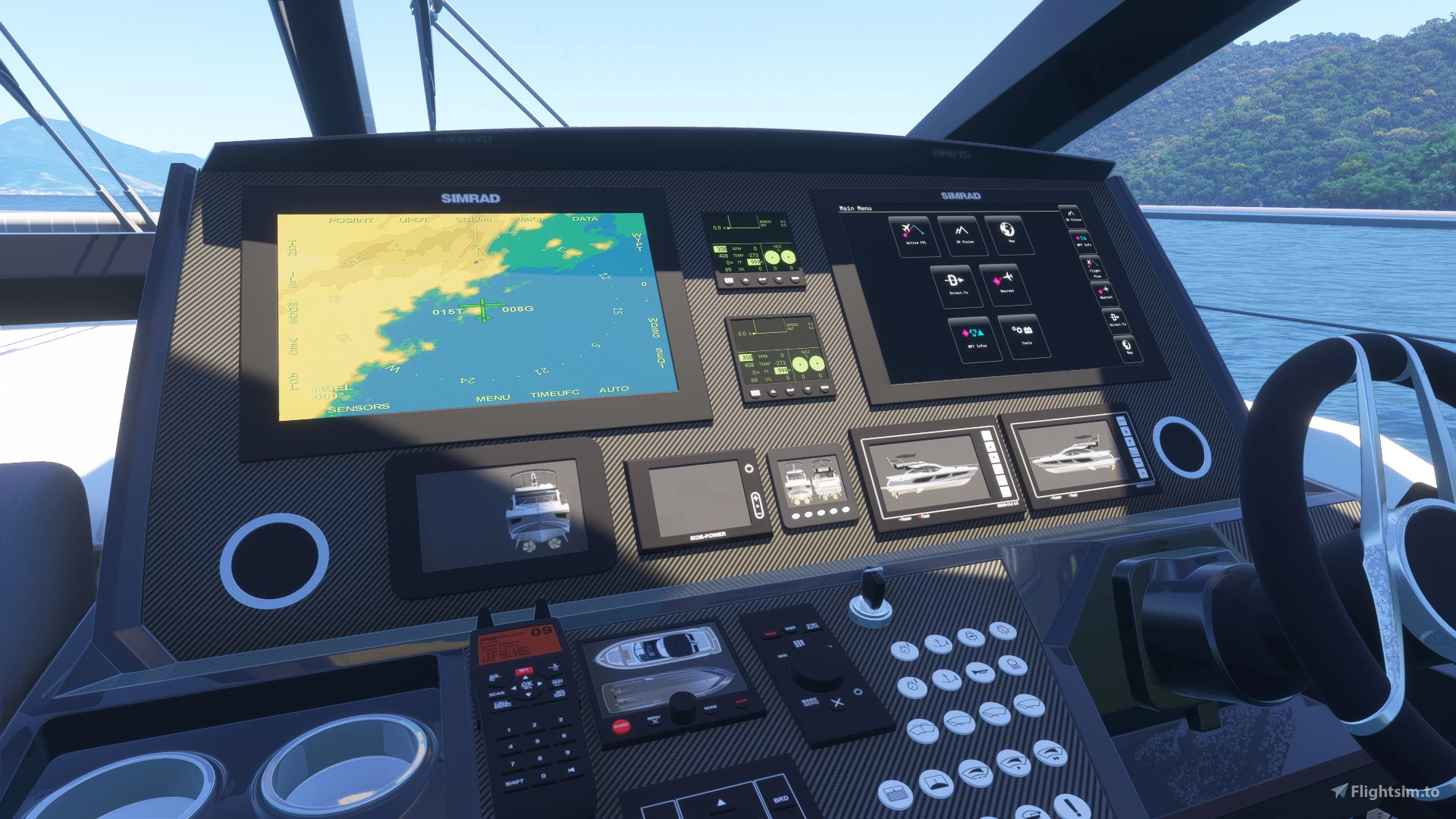
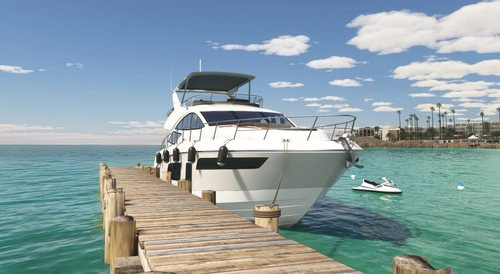
Experience the next generation with the 74ft Sport Yacht, now available as a player-controlled vehicle in the Microsoft Flight Simulator 2024. Marine RM's newest sports yacht has been recreated with high-quality 3D modeling and 4K PBR textures, ensuring a detailed and immersive visual experience, allowing you to walk onto a deck below the waterline with a detailed boat interior with bedroom and bathroom , as well as 10 painting options to enjoy your ride.
The boat is equipped with complete nautical systems, an integrated GPS system and control functions for the anchor and rooftop. Control of the 74ft Sport Yacht is managed by a unique control system developed by Marine RM, designed specifically for nautical operations in the Flight Simulator environment using joysticks, bringing an intuitive and responsive interface that takes the maritime experience to the next level between ease and realism.
The boat is entirely new and has exclusive features designed for MSFS 2024 since the beginning of its development, such as a hull resistant to the movement of sea waves, making the vehicle move according to the action of waves and wind
RESOURCES:
- Multifunction Tablet
- Easy Cold Start
- Improved navigation physics
- Radar animations
- Functional displays with GPS and navigation
- Water balance
- Detailed room and interior
- Start anywhere in the world over water (select the option (Start on Ground in the flight menu)
- Night lights
- The water trails instantly when on the move
- Different paints in the livery menu
- Add or remove people via the payload menu
- Sounds
- Friendly fps
HOW TO INSTALL:
Locate the Microsoft Flight Simulator 2024 installation folder
You need to find and open the folder called "Community"
Copy the folder "marinerm-74ft-sport-yacht" you just extracted to the Community folder.
Start the game and the "Marine RM 74ft Sport Yacht" will be in its hangar ready to sail!
HOW TO PLAY:
Start the game anywhere in the world on the water or seaplane track, PRESS THE X KEY ON THE JOYSTICK TO REMOVE THE ANCHOR, put the engine at 100% and wait a few seconds for the boat to start moving. Water trails start with the slowest speed you are on. The boat have a reverse engine. Click Ctrl + L to activate a night navigation lights. Use the Flaps control to make the Rooftop visible.
Use the aileron controls to turn left and right. The rudder controls simulate axial movement control and do not activate the steering wheel animation, only the aileron control activates the steering wheel animation, as it is the main control method.
It is important to note that the X key on the Joystick is configured as the aircraft brake. Therefore, if you use other control hardware and need to find the button to change according to your hardware, look for the brake activation button.
The most recent update (1.4) added the ability to walk around the boat. It is important to note that this ability had not been added before due to lack of documentation to enable this feature - every boat since its development has been designed for this. Note that you will start on the lower deck, in a hallway leading to the bedroom.
The latest update (1.5) adds Autopilot to the GPS NAV function to make it easier to navigate long distance routes. In Microsoft Flight Simulator 2020, consider activating the Autopilot using the "Y" button on the Joystick, or "Z" on the keyboard and it will automatically steer along the programmed route. In Microsoft Flight Simulator 2024, when you turn on the Main Autopilot (you can set this function to "Y" on your joystick) it will lock onto the current horizon. To have your boat follow the route programmed in your GPS, consider setting the "Enable Autopilot NAV1 Maintenance" function in Settings > Control > Autopilot > NAV
Understand that a Yacht is a small vessel, with limited space and mobility. MSFS's walkaround mode has very limited contact detection, which makes moving around in enclosed spaces like boats difficult to do realistically. In the bedroom, the character will appear crouched down, although there is room to stand up. Unfortunately, some walls and boundaries of the boat had to be ignored in order for the character to be able to move around. Understand that this is not a product defect - by adding boundaries exactly on the walls and edges of the boat, the character becomes trapped and impossible to control.
- IMPORTANT: JUST AS YOU WOULD NOT DO IN REAL LIFE, DO NOT GO OUT IN THE SEA WITH WAVES HIGHER THAN 40 KNOTS (74KM/H) AT THE RISK OF CAPSIZING THE BOAT AS IT WOULD HAPPEN IN REAL LIFE.
- DURING THE SIMULATION, THE SINKING OF THE BOAT IS NOT DRAMATIC AND UNEXPECTED EFFECTS MAY OCCUR CAUSED BY THE SIMULATION ENVIRONMENT ITSELF AND NOT BY A PRODUCT DEFECT
Some users have reported that the function monitor with clickable buttons to activate or deactivate anchors, lights and other functions is not working. To solve this, I created an update where the boat functions are controlled by the joystick. This has been caused by a limiter added by Microsoft/Asobo in XML scripts that has also been reported by other developers. There is an ongoing update by Microsoft to fix the problem; please understand that this is not a product defect and we hope that soon the yacht will be working in all its functions.
It is important to say that Microsoft Flight Simulator is a game being released in its initial version. The boat was built, approved and published from the Dev Alpha provided by Microsoft, and unexpected situations may happen until the game reaches a stable version. Please understand that unexpected situations may not be a defect of the product, but of the Simulator. Write to my email about any unexpected situation, I will be working on the launch days to mitigate any problems that may happen.
FAQ directly from the website: https://www.roprodaudiovisual.com/74ft-sport-yacht
Changelog
Fixed autopilot navigation system
- Added autopilot and GPS nautical system
- Added Autopilot (see description to use it)
- Added ability to walk on the boat It is important to note that this ability had not been added before due to lack of documentation to enable this feature - every boat since its development has been designed for this
- Added a system to control functions from the Joystick, eliminating the need to activate functions from the boat's panel. As of this update, the anchor (X button on the Joystick), Rooftop (flap lever) and navigation lights/headlights (Y button on the Joystick) are controlled from the physical joystick for PC/Xbox. If you have other control hardware, simply assign the functions to the desired buttons. Anchor is equivalent to the wheel brake button, Rooftop is equivalent to the flap lever and navigation lights/headlights are equivalent to the autopilot switch. It is important to remember that, if you use other control hardware, always keep your landing gear lever raised (as if you were in flight) before and during use of the boats.
User Reviews
marepnl
VerifiedAug 27, 2026
very nice work perfevt after a little i study
AeroSims
VerifiedAug 25, 2026
not a bad.

Helpubuild
VerifiedApr 27, 2026
I had a few things I could not work out so contacted the developer who kindly took a lot of time by email exchanges to help me resolve all matters that I could not sort myself. Rodrigo is a most talented and accommodating gentleman, openly willing to provide his time and expertise to assist his customers and for that I am genuinely impressed by the yacht and moreover his generosity with his time at a time he is very busy with new builds and updates. Thank you so much for opening up MSFS 2024 to watercraft for us customers to enjoy.

Xhergio
VerifiedAug 30, 2025
Much more happier than with the Super Yatch. More stable and GPS navigation much more accurate. I really love these boats. Im trying to contact developer many times but it is impossible to get an answer. I want to buy catamaran but I dont know if sleep area is modelled or not and if it has auto pilot for long navigations. Anyway as it is impossible to contact developer I give it a 1.
Doey
VerifiedAug 20, 2025
I am very disappointed: the boat looks beautiful visually, but unfortunately that’s all. The maximum speed advertised on the store is 38 knots. However, in calm seas and on a straight line, with throttle at 100%, I’ve never been able to exceed 27 knots. When I leave the helm, I end up in the water a few meters to the left of the boat. If I drop the anchor, the boat floats 1 meter above the water. It’s impossible to bring it back down, and the speed won’t go past 7 kt. I’m forced to restart the game to get it back in the water. I tested with both a HOTAS and an Xbox controller, same problems on both. I play in virtual reality, so in first-person view. Since the windows are blurry, the entire scenery is blurry too, which is horrible. There is a second helm station outside on the upper deck, but it’s unusable. Aside from the screens, the throttle, and the starter key, no other button is functional.
SavageFPV
VerifiedApr 13, 2025
Just bought this, but I got engine sounds at all. Any thoughts or ideas?

MrAviatorPilot
VerifiedMar 6, 2025
10/10 the sounds and physics are on point love the cabin and the water effects!
ghostrider1956
VerifiedJan 21, 2025
The yacht gets a little quirky at first start,but after that it handles just great and looks good. Keep it up.
fearfreeflight
VerifiedJan 16, 2025
I have an issue where the boat starts about 1 meter above the water, it's very slow when this happens and hard to maneuver. Is there a way to change this?

Do you use any external control hardware? The documentation and product description recommend using a standard joystick, since using external control hardware with the landing gear lever in the down position inadvertently before flight can cause this effect. Please understand that this is not a product defect. Starting a flight with a seaplane on the water requires the landing gear lever to be up, retracted, and not down, as if it were on a runway on the ground. Start your sail with the landing gear lever in the up position and your boat will operate normally. Happy sailing!
Thanks that helps, great boat!
pjdonovan70
VerifiedDec 21, 2024
I have been having so much fun with this boat. I am planning to travel the world in it. Only thing I cannot figure out is how to drop the anchor for the times I need to step away from the pc.
after the update I have been able to drop the anchor using the x button. I do have one question though. Sometimes I have to restart the sim several times to get the boat to start in the water and not in the air. Is there a way to stop that from happening? I looked for a start on ground option in the simulator but I cannot find it.
Its starting to become better, but still has interior that needs to be complete, no fake windows. Sounds are still terrible, and no SDK isnt' going to cut it, as there's plenty of addonswith different unique sounds. -Need dynamic RPM sounds -Need dynamic sounds so when boat is running, splashes correspond to waves especially going over water. If this is done it will make 1000 times more enjoyable and immersive, making a decent VR experience boating and not have to rely on stormworks for the itch.
MrWolfie
VerifiedDec 16, 2024
I remember there was this old sim called Virtual Sailor and this mod basically turns FS2024 into a spiritual successor to that. There's room for improvement sure but for what it's worth this mod is fantastic. I'm excited to see what's in store as development support grows.
I remember VS, right after that the developer made Vehicle Simulator which I think it's still online. I learned the dev passed away in an unfortunate plane crash earlier last year
Akula755
VerifiedDec 3, 2024
Here is an accurate run down of this product: The model itself is working and it does move with the waves which is nice. The detail in the Deck Cabin modeled good enough with rain effects for the windows. The positive ends there. Poor sound which you can hear is an obvious loop. There is 0 change of RPM or waves sounds or anything when increasing or lowering the throttle. The only sound is a flat idle sound with a boat with a very poor loop quality. There are no clickable windows, doors or anything thats interactive except the PFD screen which gives you a map and a couple other features for navigation. Of coures there is no autopilot which modern yachts have. Though the creator says you can use an anchor or buoey, nothing works on the screen. This might be featured, but the creator ignored me when I emailed him asking about it as well as other concerns. All of the windows below main deck are fake. Only the left side has part of the aft cabin modeled, and poorly done at that. Not even the forward berth cabin is modeled. You can see waves inside the boat when panning around the below cabin. This looks ridiculous. I think the creator had a great idea, but the fact its so rushed, it feels more like your purchasing a model only, and an incomplete one at that. Not a complete product for the money spent.
Hi, Akula755 Thank you for your comment, but I have to disagree with the entire assessment. First of all, regarding sounds, other developers have already opened support tickets on the Microsoft developer forum about the barrier imposed by the SDK for custom sounds that is present in the MSFS 2024 editing tools. And the same defect in the simulator is affecting clickable panels: there is a blockage reported by other developers that is preventing interaction. See: I could not under any circumstances create a panel and button and announce its function without it working. This makes no sense. In internal tests using the Dev Alpha provided by Microsoft this boat worked fine, but in the current build of MSFS 2024 things do not work as expected and understand that this cannot be considered a product defect - it is unfair after so many months of work. The lower deck is modeled and presented as described in the images and in the presentation text - hallway, bedroom and bathroom. The images show only one side and only one side was created, to maintain an acceptable FPS rate for the user. I would like your experience to be the best possible, but I cannot agree with an evaluation in which the points observed are defects of the simulator and not defects of the product.
Microsoft's response to autopilot on boats, something I tried to recreate for months before discovering it wouldn't work at all: "Engaging the autopilot (AP) on the ground in aircraft in Microsoft Flight Simulator can be problematic due to limitations specific to the software and aircraft modeling. These limitations are intentional to replicate realistic aircraft behaviors, where AP is typically engaged only in flight and after reaching a certain altitude. The altitude and time limitations are built into the simulator's internal logic and cannot be easily removed via XML or simple configuration. Modifying these parameters may require tweaks to the simulator source code or complex scripting that is not covered by the standard SDK documentation."
Thank you for replying. Though I have noted your reasons for the sound issue, AP and panels, I hope those will be fixed in a later update when able. Still, the model has an incomplete interior with no clickables.
@RodrigoMoraes94 I'm interested in boats for MSFS but I haven't bought any of your products because I've heard complaints about sounds or interactivity (pretty much like Akula755 is describing) and I take your reasoning at face value, I don't doubt your reasons but on the other hand it's the first time I've ever heard such a justification. Other developers have done ships and cars with sounds and interactions offering products within your price range so it's natural for consumers like us to expect the same minimum standard in a payware vehicle like the ones you offer.
jkanold
VerifiedNov 30, 2024
Took awhile to figure out the controls, but I am having a ball. Please create a .info file with all control assignments.
Hi jkanold Thank you for your purchase! I am updating the documentation with new control definitions as noted. Happy sailing!
74ft Sport Yacht
The 74ft Sport Yacht is a player-controlled vessel designed for Microsoft Flight Simulator 2024, featuring high-quality 3D modeling and 4K PBR textures for an immersive experience. The yacht includes detailed interiors, comprehensive nautical systems, and an intuitive control system tailored for nautical operations. With enhanced navigation physics, customizable paint options, and operational features such as a multifunction tablet, this add-on provides a realistic maritime simulation experience.
Instant digital delivery • Secure payment
Requirements
Additional Requirements
- Operating System: Windows 10 with the latest update
- DirectX: Version 12
- Processor (CPU): AMD Ryzen 5 2600X or Intel Core i7-6800K
- Video Card (GPU): AMD Radeon RX 5700 or NVIDIA GeForce GTX 970, both with at least 4 GB of VRAM
- RAM memory: 16 GB
- Storage: 50 GB of available space
- Internet Connection: Minimum bandwidth of 10 Mbps
More by this publisher
Details
- Category
- Aircraft
- Release Date
- Nov 18, 2024
- Last Updated
- Jun 22, 2026
- Reviews
- 13
- Compatibility
- MSFS2020/24